Notes & Tool-Result Pruning for Agent Context Management
Agent context management is choosing what tokens stay visible as a task runs: write durable notes to a file, then prune tool output once it's been used.

Twelve turns into a Claude Code session, the agent asks you again which config file holds the database URL. It read that file eight turns ago. Nothing deleted it. It's still sitting in the transcript, buried under three test runs and a dependency install log that together outweigh it by a factor of twenty.
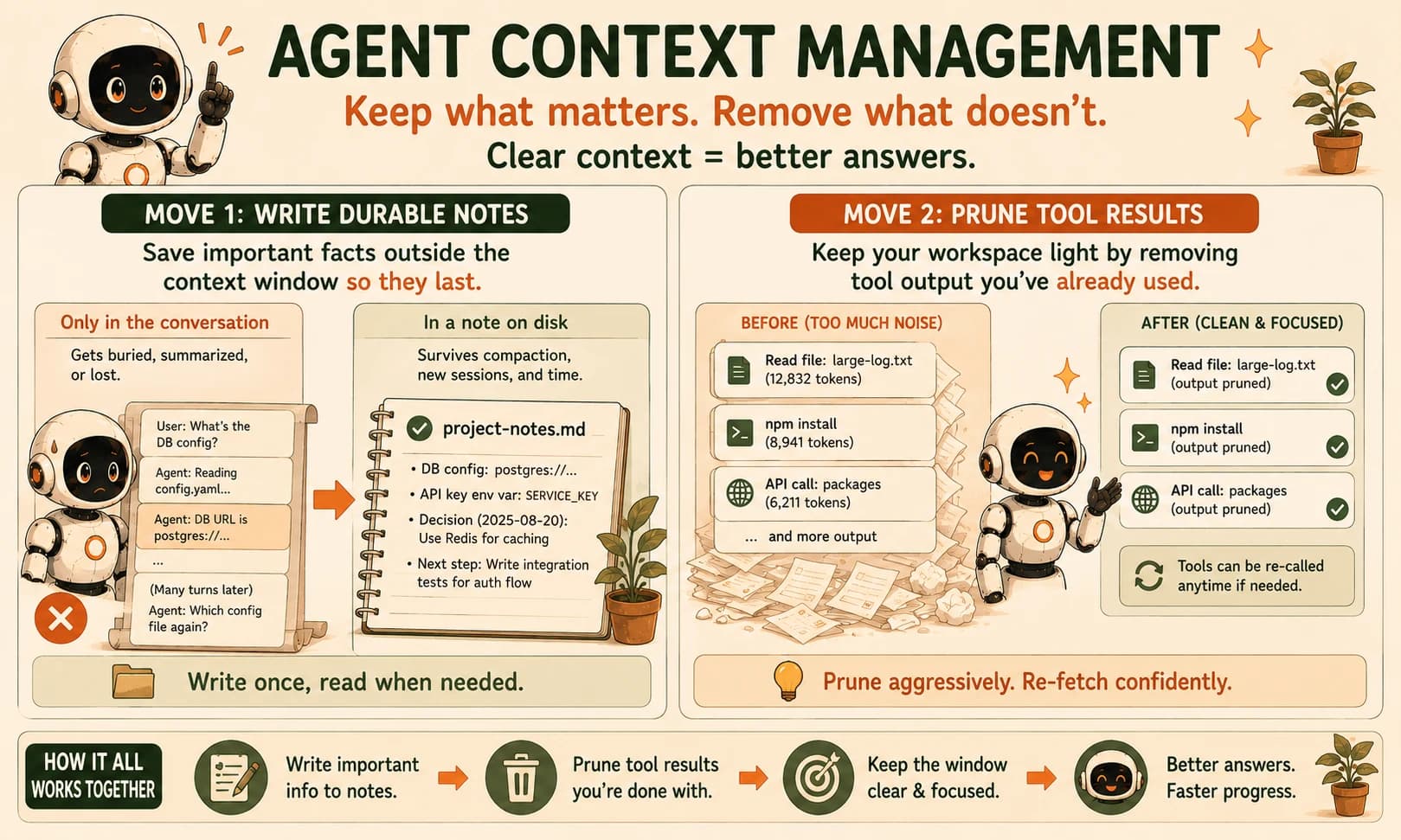
Agent context management is the discipline of deciding, on purpose, which tokens stay visible to a model as a task runs, instead of letting every tool result and message pile up by default. The two moves that do the most work here are writing durable notes to a file outside the window and pruning tool output once it's been read. Notes make a fact survive independent of the conversation. Pruning stops old noise from competing with what matters right now. Here's what that looks like in practice.
Key Takeaways
- Agent context management means deliberately choosing what stays in the window, not just watching it fill up.
- Writing notes to a file outside the context window makes a fact durable, independent of compaction or a fresh session.
- Pruning tool results only works safely on cheaply re-callable output, like file reads or public API calls, never on expensive or rate-limited ones.
- A tokens-in-context chart, drawn from your own agent run, is the concrete way to prove these two moves are working instead of just assuming they help.
What Is Agent Context Management?
Agent context management is the ongoing decision, at every turn, about which tokens an agent needs to see next, instead of defaulting to "keep everything." The statelessness problem lesson covered why nothing survives a fresh session on its own, and context rot covered why a growing window makes the model less reliable even when nothing important has technically vanished. Context management is the active response to both: you decide what earns a place in the window, rather than letting accumulation decide for you.
That decision splits into two habits that work at different points in a task's life. One handles knowledge you want to keep. The other handles output you're done with.
Move 1: Write Durable Notes Outside the Window
Writing durable notes means saving a fact, decision, or piece of progress to a file on disk the moment it matters, rather than trusting it to stay visible in the conversation until you need it again. A file survives compaction, survives a session restart, and costs nothing to hold onto between the moment you learn something and the moment you need it back.
Anthropic's own engineering team names this pattern directly in its guide to effective context engineering for AI agents: Claude Code's to-do lists and a custom NOTES.md file both work by writing progress outside the context window and pulling it back in only when relevant.
Their own example is almost funny in how literal it is. An agent playing Pokémon across thousands of turns kept an exact running tally, "for the last 1,234 steps I've been training in Route 1." It wrote that count to a file instead of trusting a conversation that had long since outgrown any model's reliable attention span.
The instinct to skip this feels reasonable in the moment. The fact is right there in the transcript, why write it down twice? But "right there in the transcript" is the problem once that transcript hits 40,000 tokens. By then the fact is buried somewhere in the middle, the same zone where context rot research shows a model pays the least attention. A note file doesn't have a middle. It has whatever you decided was worth keeping.
Keep the notes file to genuinely durable facts: decisions made, files touched and why, numbers you'll need again. Don't turn it into a second copy of the whole transcript, that just recreates the bloat problem one file over.
Move 2: Prune Tool Output That's Earned Its Keep
A 5,000-token tool call response you already extracted one number from is dead weight for the rest of the session. Pruning is how you clear it, while keeping proof the call happened, the moment it stops earning its keep. Leave it in place and it just competes for attention with everything that matters right now.
Anthropic's context management API does this with a feature it calls tool-result clearing. It replaces an old tool_result block with a short placeholder, but leaves the tool_use record intact. The model always knows a call happened and can simply call it again if the data turns out to still be needed.
In one of Anthropic's own research-agent walkthroughs, a run that read eight documents peaked at 335,279 tokens with no clearing. Turn clearing on, keeping just the four most recent tool results, and the same run peaked at 173,137 tokens, a cut of roughly 48%. A smaller demo, clearing everything but the single most recent tool result, took a 128,740-token run down to 43,060, a 67% reduction.
That only works safely on output you can afford to re-fetch. A file read or a public API call is cheap to call again if you guessed wrong about needing it. A rate-limited request, a paid API call, or anything genuinely one-shot is not. Clear that kind of result blind, and a tidy context window turns into a bill you didn't mean to run up.
Never prune a tool result you can't cheaply get back. If a call is expensive, rate-limited, or truly one-time, extract what you need into your notes file first, then clear the raw output, don't clear it and hope you guessed right.
Why Context Management Compounds as Sessions Get Longer
The value of both moves grows with session length, because the cost of skipping them grows the same way. A short, five-turn task barely notices a little tool-output bloat.
A session that runs for hours is different. Context rot already warned that these sessions degrade quietly, well before you'd expect. Stretched that long, the same bloat becomes the exact middle-of-context noise a model handles worst.
This lesson's two moves are proactive hygiene, done continuously as a task runs. They sit next to, not instead of, two other habits. One is reactive compaction: triggering a summary once you cross a rough token threshold.
The other is longer-horizon: a shift-style progress file so a brand-new session can pick up cleanly later in this module. Think of notes and pruning as the daily tidying that makes those bigger interventions less urgent, not a replacement for either.
I've watched an agent burn most of a minute re-fetching three files it had already cleared from context. It still finished faster than the version that never pruned anything. That version stalled out, crawling through a context window stuffed with old test output it no longer needed.
Instrument the Curve: Build It in Claude Code
A claim about tokens flattening is worth nothing until you've measured it yourself, on your own task, in your own session. That's exactly what this lab produces: two real numbers, side by side, from a run you built.
Pick a multi-step task and a baseline run
Choose a task that takes at least eight to ten tool calls in Claude Code, for example, "read every file in this repo's src/ folder, summarize what each one does, then write a one-paragraph architecture overview." If your src/ is smaller than that, pick two folders or add a second small task to reach the threshold.
Create learning-log.md now and start a "Baseline run" table in it with two columns, turn number and token total. Run the task once with no changes to how you normally work. After each tool call, check Claude Code's /context command and log the running input-token total straight into that table.
Add a notes file to the same task
Before running the task again, tell the agent explicitly: "Before you finish, and after every file you summarize, append a one-line note to progress-notes.md with the filename and a one-sentence summary." Re-run the task. Confirm the file exists and has one line per source file by the end.
Add tool-result pruning to the same run
On a third run of the same task, instruct the agent: "After you've written a file's summary to progress-notes.md, treat that file's raw contents as no longer needed in this conversation. Don't re-read it unless I ask." This is a natural-language instruction, not a hard guarantee, so if the agent re-reads a file anyway, note that in learning-log.md rather than forcing the numbers.
If you're driving this through the Agent SDK instead of the Claude Code UI, wire in the context-management-2025-06-27 beta's clear_tool_uses_20250919 edit with a keep value of 2 to 4 recent reads for an enforced version. Log the running token total after each tool call again, in a second "Notes + pruning run" table, same as step 1.
Chart both curves and commit them
In learning-log.md, below your two tables, write one or two sentences describing where the two curves diverge and by roughly how much at the final turn. If the two runs made a different number of tool calls, say so, agent runs aren't perfectly repeatable, and that's worth naming rather than hiding. Commit learning-log.md and progress-notes.md together.
Done? You've completed Lesson 19.04.
FAQ