Best MCP Servers to Use (and How to Vet One First)
The best MCP servers to install first, filesystem, GitHub, Postgres, Slack, and the exact checks to run before you trust any third-party one.

You connect a new MCP server because a tutorial said it was useful, watch it work exactly as advertised, and only later notice the permission prompt you clicked past: it asked for your whole GitHub account, not just the one repo you meant to use it on.
The five MCP servers worth installing first are filesystem, fetch, GitHub, Postgres, and Slack, and the one rule that matters more than which servers you pick is this: popular isn't the same as safe. A server is code that runs with real access to your files, accounts, or data, so before you connect any third-party one, you check who built it, what it can actually touch, and whether that matches what it claims to do.
Below: what each of those five servers is actually good for, what "trusting" a server really means, the four checks worth running before you connect one, and a worked example vetting the GitHub MCP server, since that's the one you'll connect in this lesson's lab.
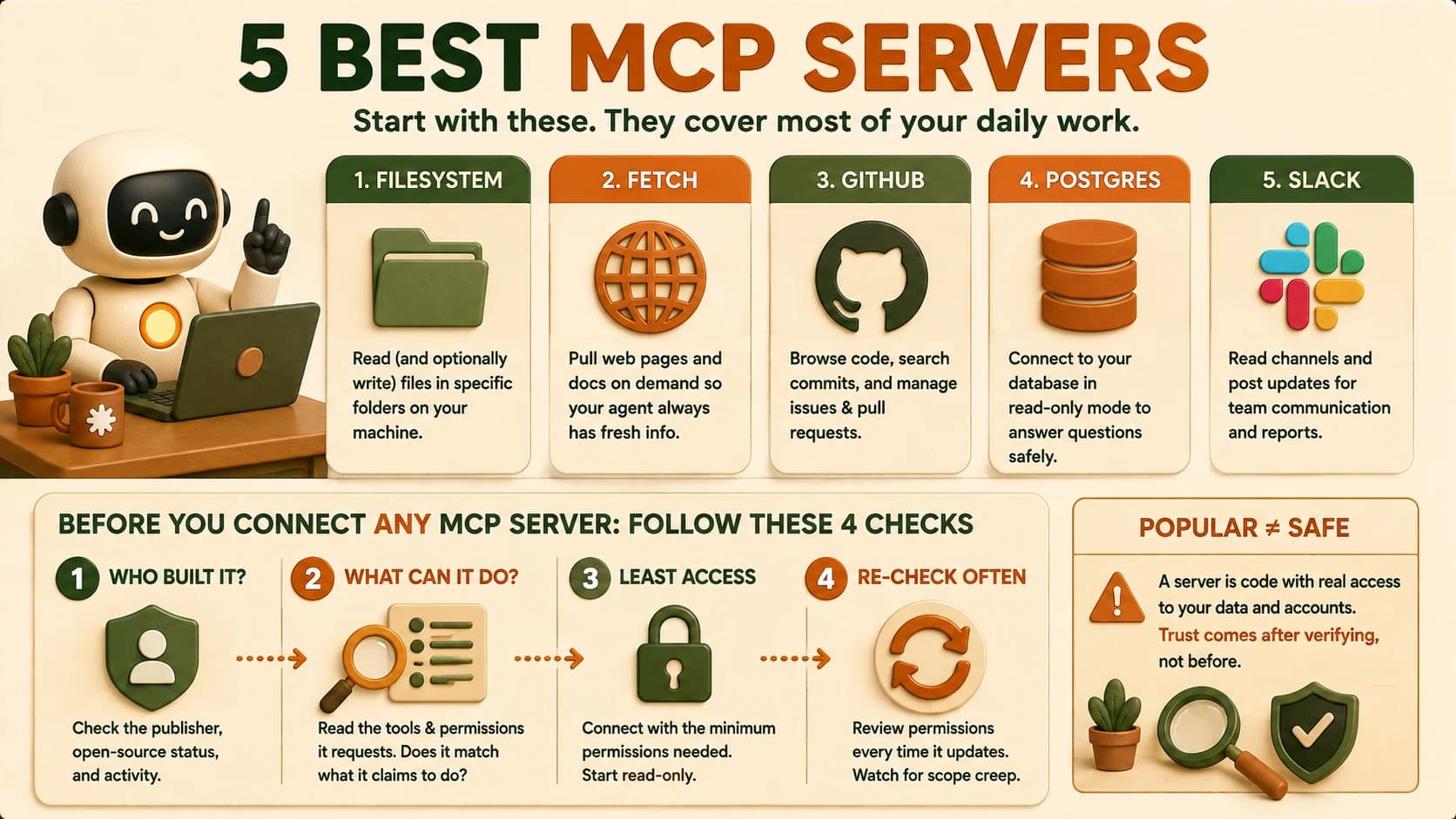
The Five Best MCP Servers to Install First
Most daily agent work is covered by a small set of servers, not the hundred-plus you'll find in any community directory.
Filesystem gives your agent read (and optionally write) access to a folder on your machine, scoped to exactly the directories you name. It's the server behind "let Claude read my whole project" instead of pasting files in one at a time.
Fetch retrieves and reads web pages and documentation on demand, so your agent can pull a changelog or an API reference mid-task instead of relying only on what it already knows.
GitHub exposes repository operations: browsing code, searching commits, and managing issues and pull requests. It's the server this lesson's lab uses, because it's also the one most likely to be over-scoped by default.
Postgres connects your agent to a database, most usefully in a read-only role so it can answer questions from real data without any risk of it writing back.
Slack lets an agent read channel history or post updates, useful for status reports or summarizing a thread, but it's also a server worth scoping tightly, since it can see or send messages on your behalf.
Anthropic open-sourced most of its original reference servers alongside MCP itself in late 2024, but in 2025 it moved 13 of the original 20, including GitHub, Slack, and Postgres, into a servers-archived repository. They're now maintained by their respective vendors or the community instead of Anthropic directly. That's not a downgrade, but it does mean "official Anthropic server" is no longer an accurate description for most of the servers on this list, which is one more reason the source check below matters.
What "Trusting" an MCP Server Actually Means
Trusting an MCP server means accepting that its code runs with whatever access you grant it, the same category of decision as installing a browser extension or an npm package, not a sandboxed plugin you can safely ignore.
That distinction matters because an MCP server isn't reviewed by Anthropic, Cursor, or Claude Code before you connect it. If the primitives it exposes include a tool, your agent can call that tool the moment it decides to, with whatever permissions you granted at connection time. Nothing in the protocol stops a tool named search_notes from also reading files outside your notes folder if the server's author wrote it that way.
I've connected a server whose install instructions asked for a token scoped far wider than the one feature I actually wanted, and the only reason I caught it was reading the scope list before pasting the token in, not after. That's the habit this lesson is trying to build before it becomes a real mistake instead of a caught one.
How to Vet a Third-Party MCP Server Before You Connect It
Vetting a server before you connect it comes down to four checks: who built it, what it actually does, how little access it needs to do that, and whether anything changed the last time it updated.
Check the source. Confirm the GitHub organization or npm publisher actually belongs to who it claims to be. An MCP server that touches your GitHub account should come from github.com/github, not a personal fork with a similar name.
Audit the tool list, not the description. Read what each tool the server exposes actually does. A documentation server shouldn't need filesystem access. A weather server shouldn't be able to execute shell commands. If a tool's permissions don't match its stated job, that mismatch is the finding, not a detail to skip past.
Connect with the least access that works. Start read-only wherever the server supports it, and grant write or broader scopes only once you've confirmed the read-only setup actually does what you need. This is the single highest-use habit in this whole section, because it caps the damage even if something else about the server turns out to be wrong.
Re-check after every update. A server that was safe at install time can change. This is called a rug-pull: a tool behaves well long enough to earn trust, then an update adds behavior you never approved. MCP's own security best practices documentation is explicit that the protocol has no built-in authentication or integrity check by default. A 2025 security assessment of public MCP servers found 43% allowed command injection, 30% would fetch any URL handed to them, and 22% could read files outside the directory they were supposed to be scoped to. Those numbers describe servers people were already running, not a hypothetical.
A server that behaves perfectly for months isn't proof it's safe forever. If an MCP server updates and its permission list grows, or a tool it never had before shows up, treat that the same way you'd treat a browser extension suddenly asking for a new permission: as something to review before you accept it, not after.
Connecting the GitHub MCP Server, the Vetted Way
The GitHub MCP server needs a personal access token, and the scopes you grant that token are exactly the access boundary this lesson's checks are protecting. The official GitHub MCP server documentation spells out exactly which scope each tool group needs, which is the first thing to check before you request anything broader.
For triaging issues and reviewing pull requests, three scopes cover it: repo for repository operations, read:packages if you need Docker image visibility, and read:org for organization-level context. Add the --read-only flag on top of that, and the server skips write tools entirely, even if a future config change accidentally re-enabled them.
Start there, run your agent against a task that only needs reads, and confirm it works. Only after that should you consider adding write scopes, and only for the specific write action you actually need, not a broad grant "in case it's useful later."
A wider permission grant almost taught me this the hard way: a token scoped for admin:org will do everything a repo-scoped token does and a great deal more. An agent that only needed to triage issues never needed to see that much of an organization's settings in the first place. Scoping down first and widening only when something concrete requires it is the entire discipline.
What's the Difference Between a Safe and an Unsafe MCP Server?
The difference isn't the server's popularity or how polished its README looks. It's whether its actual permissions match its actual job, and whether you'd notice if that stopped being true.
An unsafe server is one where a tool's real behavior doesn't match its name, where it asks for more access than its stated purpose needs, or where you granted broad access once and never looked again. Tool poisoning (a tool that looks harmless, like a calculator, but is written to do something else entirely) and rug-pulls are both variations on the same failure: you trusted the label instead of checking the substance. Everything in the checklist above exists to close that gap. Later in this module, MCP Security and the Trust Boundary goes deeper into threat-modeling a server someone else built, including auditing one that's deliberately been made vulnerable.
Your Lab
Connect the GitHub MCP server, read-only
Register the GitHub MCP server in Cursor or Claude Code, using the setup method from 18.05, with a token scoped to repo, read:packages, and read:org, and the --read-only flag set.
Triage 3 real issues
On a repository you own, have your agent read and triage 3 open issues: summarizing each one, suggesting a priority, and flagging any that look like duplicates.
Log exactly what it requested
In learning-log.md, list the exact permissions and scopes the server requested during setup.
Name one thing you wouldn't want an untrusted server to do
In the same log entry, write one concrete action an untrusted MCP server could take with broader access than this one has, and why the scoped-down setup you just built prevents it.
Done? You've completed Lesson 18.06.
FAQ