MCP Tools, Resources, and Prompts: The Control Split
MCP servers expose three primitives: tools, resources, and prompts. Here's what each one is and why the control split behind them actually matters.

The first MCP server I registered had exactly one capability: a tool that fetched a notes file. It worked, but the model called it on nearly every turn, even when nothing about the notes had changed, because a tool is what the model reaches for when it isn't sure what else is available. Once I turned that same file into a resource, the token spent re-fetching it dropped by more than half in the same session, because the host loaded it once instead of the model re-asking for it.
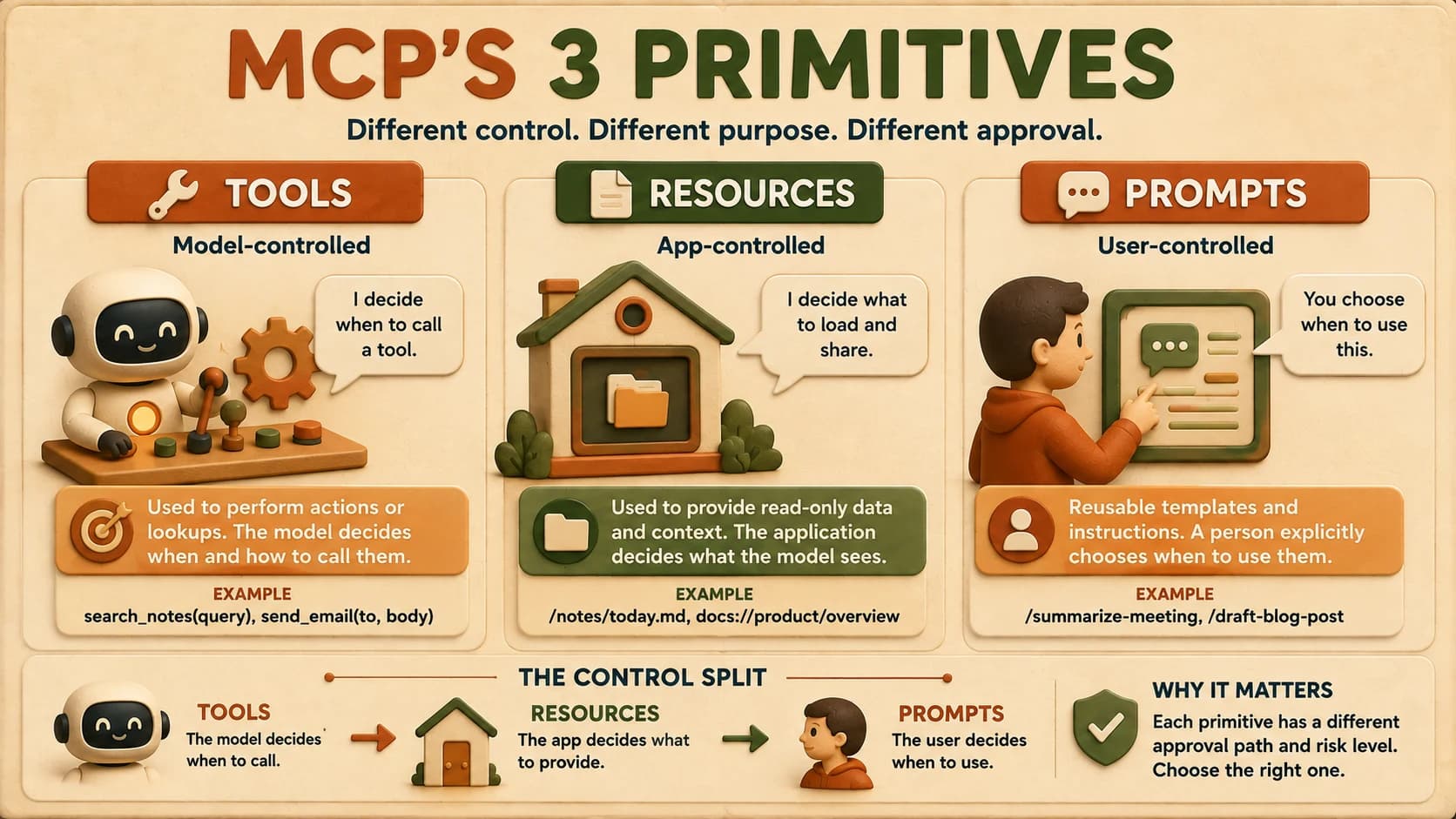
MCP servers expose capabilities through three primitives: tools, resources, and prompts, and each one is controlled by a different party. Tools are model-controlled: the AI decides when to call them. Resources are app-controlled: the host decides what to load. Prompts are user-controlled: a person explicitly picks them. Get the assignment wrong and you don't just waste tokens; you can also skip the approval step a capability should have required.
If you haven't yet walked through why MCP exists or MCP's architecture, that's worth a quick pass first. This lesson builds directly on those roles.
Key Takeaways
- MCP defines three server-side primitives: tools (model-controlled), resources (app-controlled), and prompts (user-controlled)
- The control split decides who approves a capability before it runs, not just what the capability does
- Most MCP tutorials only cover tools in depth; a 2026 survey of real servers found that almost none expose prompts
- The practical heuristic: if the model needs to invoke a parameterized operation, build a tool; if it's just readable context, build a resource
- Picking the wrong primitive can quietly remove a safety check, not just cost extra tokens
What Are Tools in MCP?
A tool in MCP is a function the model decides to call on its own, usually because a task requires an action or a lookup the model can't do from its training data alone. If you've read how tool calling actually works, MCP tools are the exact same mechanism, just wrapped in a standard protocol so any MCP-speaking agent can discover and call them.
Say a note-taking server exposes search_notes(query). The model sees the tool's name, description, and schema in its context, and when a user asks "what did I write about vector databases last week," the model decides on its own to call search_notes("vector databases"). That's the defining trait: the model is in the driver's seat. It picks the tool, fills in the arguments, and reads back the result.
Because tools can execute arbitrary code and cause real side effects (writing a file, sending a message, hitting an external API), the MCP specification requires the host to get explicit user consent before invoking one. That single requirement is why the control label matters more than it sounds: "model-controlled" isn't just a taxonomy word, it's the reason a permission prompt exists in the first place.
What Are Resources in MCP?
A resource in MCP is read-only, addressable data your application decides to load and hand to the model as context, without the model asking for it turn by turn. A note-taking server's notes://all endpoint, a database schema, and a report template are all resources: each one is identified by a URI the same way a URL identifies a webpage.
The common shorthand across most MCP write-ups is "resources are app-controlled, full stop." The actual specification text is more precise: it defines resources as "context and data, for the user or the AI model to use." In practice, most hosts still let the application decide what to load and when. That's the useful mental model to build with, but it's worth knowing the spec leaves room for either side to consume a resource, rather than treating it as a hard, model-blind wall.
Don't let the nuance change your default. If you're deciding where a new capability belongs, treat resources as the host's call, not the model's, and reserve tools for anything the model needs to actively invoke.
The practical rule that shows up across recent MCP guides: resources for read, tools for write. If a capability only returns information and never changes anything, it's a strong candidate for a resource. The moment it mutates state, it needs to be a tool, because mutation is exactly the kind of action that requires the model's explicit decision and the user's explicit consent. Get this backwards and the model either re-fetches a static resource every turn for no reason, burning tokens on data that hasn't changed, or worse, a write gets exposed as if it were harmless reading.
What Are Prompts in MCP?
A prompt in MCP is a reusable message template a server exposes, and a person, not the model, chooses when to run it. In a host like Claude Code, these often surface as slash commands: the note-taking server might expose a /summarize-week prompt that assembles the last seven days of notes into a single templated request.
Prompts are the primitive almost nobody builds. A 2026 review of real MCP deployments put it bluntly: most servers expose tools, a growing number expose resources, and almost none expose prompts. The stated reason is unglamorous: tools are easy to demo, and most SDKs give prompts weak support for anything beyond a single static template, so teams skip the investment a real multi-step prompt workflow would take.
That gap is an opportunity, not just a trivia fact. Skip prompts entirely and every repeatable workflow falls back on the user re-typing the same multi-step request by hand, or the model reconstructing it slightly differently each time, which is exactly how "summarize my week" quietly turns into five different summaries depending on the day. A well-designed prompt turns a repeatable, multi-step request (gather this week's notes, group by topic, draft a summary) into a one-click action a user triggers on purpose.
Why the Control Split Actually Matters
The control split decides who has to approve a capability before it runs, which is a security and UX decision disguised as a taxonomy. Put a destructive action behind the wrong primitive and you don't just get a slower or clunkier server: you can silently remove the consent step that action should have required.
MCP's three primitives, compared
| Primitive | Who controls it | Side effects allowed | How it gets triggered |
|---|---|---|---|
| Tools | The model | Yes, with explicit user consent per the spec | Model decides mid-conversation |
| Resources | The application/host | No: strictly read-only | Host loads it, with or without a model request |
| Prompts | The user | Depends on what the prompt assembles | User explicitly selects it (e.g. a slash command) |
Picture a note-taking server that lets the model "archive a note" by exposing it as a resource instead of a tool. Resources are supposed to be read-only, so a host built to that assumption may never surface a consent prompt for it. The archive action runs without the review a genuine write operation should get.
The fix isn't a bigger warning label; it's choosing the right primitive from the start. A state-changing action belongs behind a tool, every time.
Choosing the Right Primitive for the Note-Taking Server
The fastest way to pick correctly is the same question a confused developer asked on a public MCP course forum: does the model need to invoke a parameterized operation, or should the response just be browseable, readable context?
Apply that to the note-taking server this path builds toward in the upcoming FastMCP lesson:
search_notes(query)→ tool. It takes an argument, the model decides when to run it, and the result changes based on input. That's a parameterized operation, not static context.notes://all(the raw notes file) → resource. It's read-only, addressable by URI, and the host can load it without the model asking. No arguments, no side effects, no decision for the model to make./summarize-week→ prompt. It's a template a person picks on purpose to kick off a specific, repeatable workflow (search, aggregate, summarize) bundled into one user-triggered action instead of three separate model-initiated tool calls.
Three capabilities, three different owners, and the assignment isn't arbitrary: it follows directly from who's supposed to be in charge of each decision.
Your Lab
Design the three primitives
In a markdown file (in Cursor or Claude Code), design one tool, one resource, and one prompt for a note-taking server. Name each one exactly (e.g. search_notes(query), notes://all, /summarize-week) and write one sentence per primitive describing what it does.
Justify each control assignment
For each of the three, write two to three sentences answering: why is this the model's call, the app's call, or the user's call? Use the "parameterized operation vs. browseable context" test from this lesson for the tool/resource decision.
Commit your design
Save the file as learning-log.md in a scratch repo (or append to an existing one) and commit it with a message describing what you designed.
Done? You've completed Lesson 18.03.
FAQ