The CLAUDE.md Hierarchy: Scopes, @import, and Rules
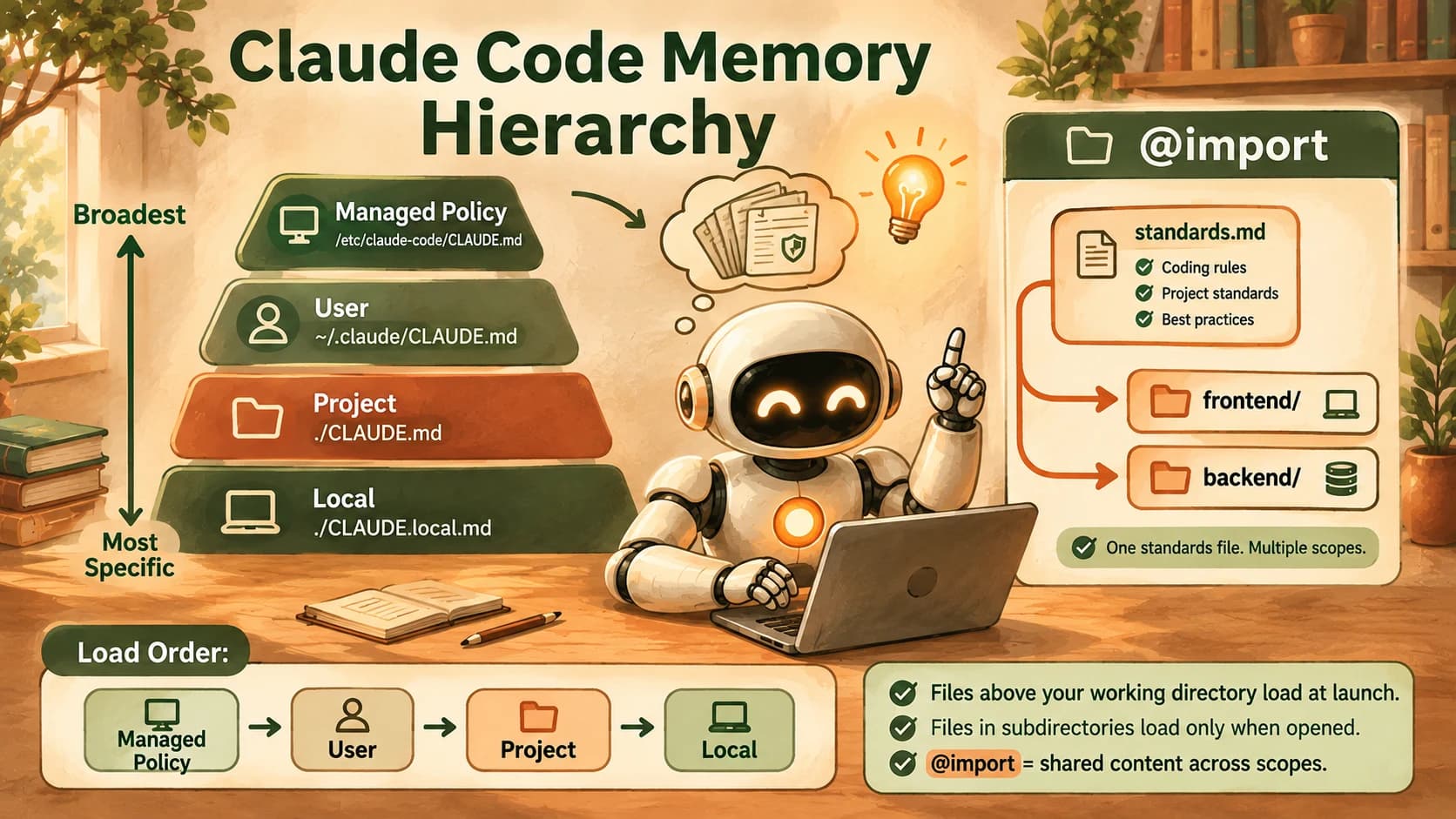
The CLAUDE.md hierarchy loads files by scope: managed policy, user, project, local, all concatenated, and @import shares one standards file across scopes.

Your repo has a backend/ folder and a frontend/ folder, and exactly one of them should never touch raw SQL without going through the query builder. Right now that rule lives in the single CLAUDE.md file you started with, sitting next to a dozen frontend-only conventions the backend agent has no use for.
The CLAUDE.md hierarchy is the order Claude Code loads CLAUDE.md files in, from broadest to most specific: managed policy, then user, then project, then any folder Claude actually opens a file in. On top of that, @path/to/file lets one CLAUDE.md pull in another file's content, so a shared standards file can feed multiple folders without being copy-pasted into each one.
Key Takeaways
- The CLAUDE.md hierarchy runs from managed policy to user to project, then subdirectories opened on demand.
- Files above your working directory load at launch; files in subfolders load only once Claude reads something inside that folder.
@path/to/fileis the whole import syntax: no special keyword, just a path with an@in front of it.- Imports can chain up to four hops deep, and an import outside your working directory triggers a one-time approval dialog.
@importand.claude/rules/path-scoping solve different problems and aren't interchangeable.
What Is the CLAUDE.md Hierarchy?
The CLAUDE.md hierarchy is the fixed order Claude Code checks for memory files, running from settings that apply to everyone on a machine down to a single project folder. It exists because every session starts with a blank slate, and a single memory file is the simplest fix, until a project outgrows one file's worth of rules. Here's every scope, in load order:
The CLAUDE.md hierarchy, broadest to most specific
| Scope | Typical location | Applies to |
|---|---|---|
| Managed policy | /etc/claude-code/CLAUDE.md (Linux/WSL) or the platform equivalent | Every user on the machine, every repo |
| User | ~/.claude/CLAUDE.md | Just you, across all your projects |
| Project | ./CLAUDE.md or ./.claude/CLAUDE.md | Everyone on the team, via version control |
| Local | ./CLAUDE.local.md | Just you, this one project (gitignore it) |
None of these override each other. Claude Code concatenates every file it finds into one context block, ordered from broadest scope to most specific, so a project-level instruction is read after your personal user-level one, not instead of it. Anthropic's own documentation on this is direct: the full resolution order runs from managed policy down through local, all appended together.
You already met a single flat CLAUDE.md, the project-scope one, in the previous lesson on CLAUDE.md as a maintained artifact. This lesson is about what happens once one file per project stops being enough.
Root, User, and Path-Scoped Memory: Who Sees What
The mechanic behind "different rules for different folders" is simpler than it sounds. Files above your working directory load immediately when Claude Code starts. Files inside subdirectories load only when Claude reads a file there.
Run Claude Code from your repo root and it loads the root CLAUDE.md on launch. If you never touch anything inside backend/, backend/CLAUDE.md never enters context at all, not because it's broken, but because nothing has asked for it yet. The moment Claude opens a file inside backend/, that folder's CLAUDE.md loads alongside it, and from then on it's part of the session.
I've had a subfolder CLAUDE.md sit there for a week doing nothing useful. It wasn't a bug. I just hadn't asked Claude to touch a single file in that folder during that stretch of sessions, so the rule never got the chance to load. The instruction was correct the whole time. It just hadn't loaded yet.
This is the exact distinction to hold onto:
- Loads at launch: the working directory's CLAUDE.md, plus every CLAUDE.md and CLAUDE.local.md in the directories above it.
- Loads on demand: any CLAUDE.md sitting inside a subdirectory, the first time Claude reads a file in that subtree.
This is the same pre-loaded versus just-in-time context tradeoff that shows up everywhere else in context engineering, here it's applied to memory files instead of retrieved documents.
Run /context in a session to see exactly which memory files have actually loaded so far. If a subfolder rule isn't showing up there, it's not that it failed, it's that Claude hasn't opened anything in that folder yet this session.
In short, the backend folder and the frontend folder can have different standing rules with no special configuration and no per-folder setting to flip. Put the SQL rule in backend/CLAUDE.md, the component-naming rule in frontend/CLAUDE.md, and let the directory Claude is actually working in decide which one applies.
Pulling in Shared Standards with @import
Some instructions genuinely belong in more than one folder: a security policy, a commit-message format, a shared lint config. Copy the same paragraph into three CLAUDE.md files, and those three copies will quietly drift apart into stale, contradicting rules, a maintenance problem, distinct from the context rot problem that degrades a single long-running session instead. @import exists for the drift problem: it lets one CLAUDE.md reference another file's content instead of duplicating it.
The syntax is deliberately unremarkable. There's no import keyword, no special block, just a path with an @ in front of it, written on its own line:
@docs/shared-standards.md
A few facts worth being precise about, because most explanations of this gloss over them:
- Relative paths resolve relative to the file doing the importing, not to your current working directory. An
@../shared/standards.mdinsidebackend/CLAUDE.mdresolves frombackend/, not from repo root. - Imports can chain, up to four hops deep. A file you import can itself import another file, and that one can import another, but the chain stops at four.
- Import parsing skips code blocks and inline code spans. Writing
`@README`in backticks just mentions the path as text;@READMEoutside backticks actually imports it. - An import that resolves outside your working directory is treated as external. The first time Claude Code sees one in a project, it shows a one-time approval dialog listing exactly which files it wants to load.
- Imported content still loads in full at launch. Splitting a CLAUDE.md into imports helps organization, not token count. Three imported files are three files' worth of tokens, same as if you'd pasted them in directly.
@import vs. Path-Scoped Rules: Two Different Jobs
It's easy to blur @import together with .claude/rules/, since both involve "extra files that affect what Claude knows," but they solve two different problems and get confused constantly in explainer content.
@import pulls a file's entire content into context, every session, unconditionally, the moment the CLAUDE.md that references it loads. It's the tool for "this content belongs in multiple places and shouldn't drift."
Path-scoped rules, set up as markdown files inside .claude/rules/ with a paths: field in their YAML frontmatter, only enter context when Claude opens a file matching that glob pattern. A rule scoped to paths: ["backend/**/*.py"] stays out of context entirely until Claude touches a Python file under backend/. Path-scoped rules exist for the opposite case: content that's only relevant sometimes, and shouldn't compete for attention the rest of the time.
Use @import when the content genuinely applies everywhere and you just don't want to duplicate it. Use a path-scoped rule when the content should only load for a specific kind of file. Confusing the two is exactly how teams end up with rules that either load constantly for no reason, or never load when they'd actually help.
Building It on a Real Repo
A two-folder repo with a shared standards file, imported from both sides, is the smallest setup that exercises every piece of this. The hierarchy decides when each folder's file loads. @import keeps the shared parts in one place instead of three.
Your Lab
Takes about 10 minutes across two short sessions.
Set up the tiered files
In a repo with at least two distinct folders (for example backend/ and frontend/), create a root CLAUDE.md, a backend/CLAUDE.md, and a frontend/CLAUDE.md. If you already have a root CLAUDE.md from the previous lesson, add to it rather than replacing it. Give each folder one rule that's specific to it, and nothing else.
Create and import a shared standards file
Write a shared-standards.md with one or two rules that should apply everywhere, for example a commit-message format. Add @shared-standards.md (adjust the relative path per folder) to the root, backend/, and frontend/ CLAUDE.md files.
Test the backend folder
Start a fresh session at repo root. Open a file inside backend/, then ask: "which rule applies to you right now that's specific to this folder?" Run /context to confirm which memory files loaded.
Test the frontend folder and compare
In a new session, repeat the same test inside frontend/: open a file there, ask the same question, and run /context again. Compare the two answers, they should name different folder-specific rules.
Commit the proof
Save all four files (root, backend, frontend, shared-standards) plus the two answers you got to learning-log.md.
Done? You've completed Lesson 19.07.
FAQ