Calling External APIs from an AI Agent: A Build Log
Watch an agent hit a real API's pagination gap and a live rate limit, then fix both with working retry and backoff code.

I ran a small script against a live public API, watched it work perfectly, and then watched it quietly return a third of the data it should have on the very next run. No error, no crash, just fewer results than there should have been.
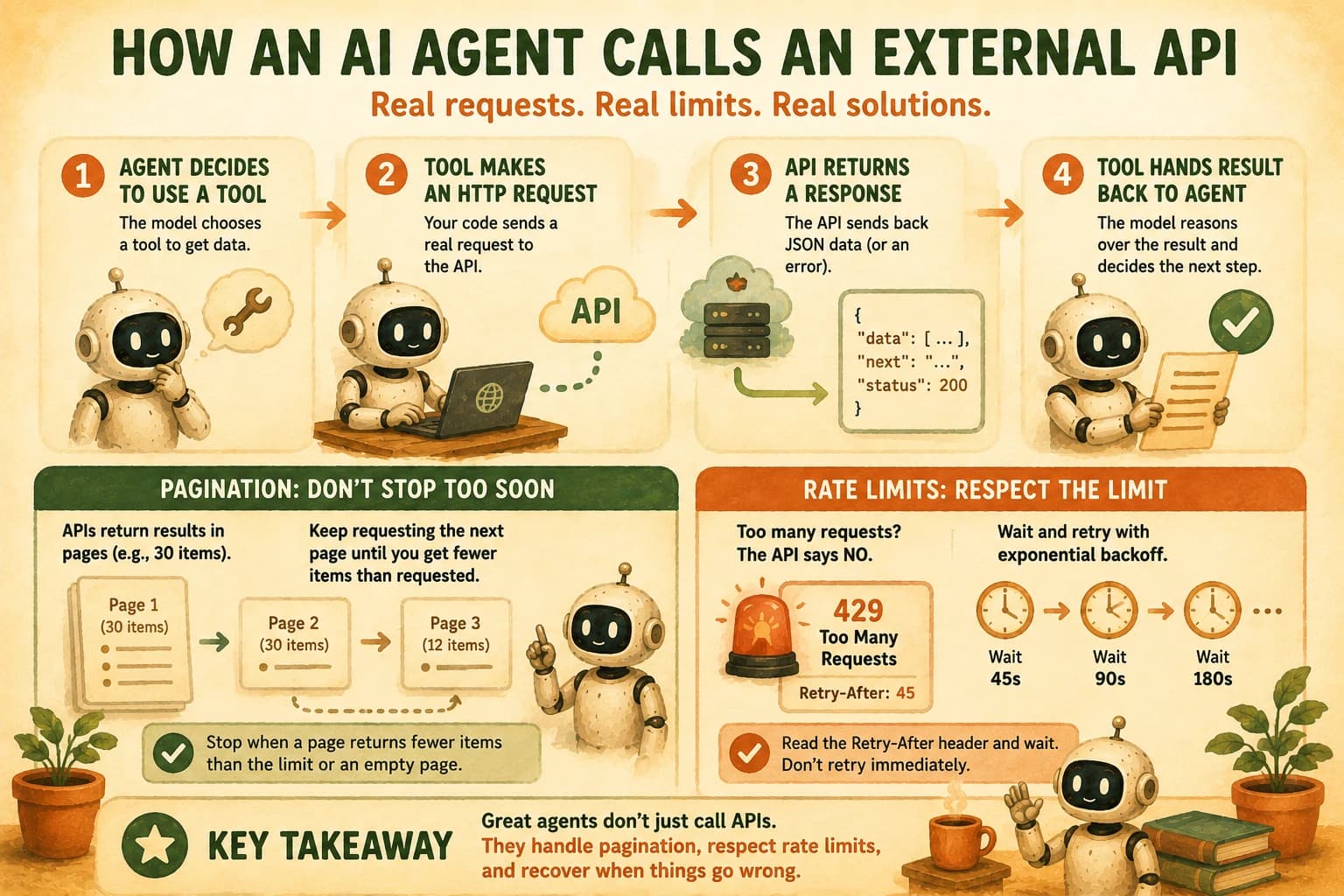
When an AI agent calls an external API, it means giving the agent a tool whose code makes a real HTTP request, then handling three things a demo never shows you: authentication, pagination, and what happens when the API says no. The model never touches the network directly; your code does the request, and the model only ever sees the JSON that comes back. Here's what breaks first, and how to fix it, using one real API the whole way through.
Key Takeaways
- An agent doesn't "call" an API itself; a tool function makes the request, and the model only sees the JSON result
- Most public APIs cap unauthenticated requests (GitHub: 60/hour) and eventually return a real rate-limit error, 429 or 403 depending on the API, with a header telling you when to try again
- A script that only reads page one of a paginated response fails silently, not loudly, which makes it more dangerous than a crash
- Two chained API calls (one call's output feeds the next call's input) is the normal shape of a real agent task, not an edge case
What "Calling an External API" Actually Means for an Agent
An agent calling an API means the model asked for a tool, and a Python function you wrote made the actual HTTP request. That request/response cycle is the same execute-append-repeat loop covered earlier in this module, just pointed at a real network call instead of a toy example. The model itself never opens a socket or reads a response body; it only sees whatever your tool function decides to hand back as the tool result.
That distinction matters more than it sounds. If your tool function returns the raw, unfiltered JSON from a paginated response, the model reasons over exactly that, incomplete page and all, with zero indication anything is missing. If your tool function crashes on a rate limit, the model just gets a tool error and has no way to know whether to try again, wait, or give up. Every failure mode below is a failure in your tool code, not in the model. That's actually good news: it means you can fix all of it without touching a prompt.
The Live API for This Build: GitHub's REST API
GitHub's REST API is a public, unauthenticated-friendly API with a documented rate limit and real pagination, which makes it the right teaching tool for this lesson: it fails in exactly the two ways a production agent needs to survive.
No API key is required for the calls in this lesson. Unauthenticated requests are capped at 60 per hour per IP address, tracked with an X-RateLimit-Remaining header on every response. Once that header hits zero, the next request comes back as a 403 or a 429, and the response tells you when you can try again, either through an X-RateLimit-Reset timestamp or, on some responses, a Retry-After header.
This lesson builds toward one task: given a GitHub username, list their public repositories, then fetch the commit history for one of those repos. That's two chained calls, one real pagination gap, and one real rate limit, all from a single free endpoint.
The Naive Version and Where It Breaks
Here's the first version, the one that looks completely correct and passes a quick manual test:
import requests

def get_repos(username):
    response = requests.get(f"https://api.github.com/users/{username}/repos")
    response.raise_for_status()
    return response.json()

def get_commits(username, repo):
    url = f"https://api.github.com/repos/{username}/{repo}/commits"
    response = requests.get(url)
    response.raise_for_status()
    return response.json()
Run it once against a small account and it works fine, because GitHub's default page size (30 items) covers everything that account has. Point get_commits at a repo with 400 commits, and you silently get back the 30 most recent ones, with no error, no warning, and no field in the response that says "there's more." The function returns valid JSON either way, so an agent reasoning over the result has no signal that anything is missing.
Fixing Pagination
GitHub paginates every list endpoint the same way: pass page and per_page as query parameters, and keep requesting pages until one comes back with fewer items than you asked for.
def get_all_commits(username, repo, per_page=100):
    commits = []
    page = 1
    while True:
        url = f"https://api.github.com/repos/{username}/{repo}/commits"
        response = requests.get(url, params={"page": page, "per_page": per_page})
        response.raise_for_status()
        batch = response.json()
        commits.extend(batch)
        if len(batch) < per_page:
            break
        page += 1
    return commits
per_page=100 is GitHub's max, so this stops after the fewest requests possible. The loop's exit condition is the important part: it stops on a short page, not on an empty one, because the last page of real data is almost never exactly a multiple of 100.
This same shape (page, per_page, "stop when the page is short") shows up on enough real APIs that it's worth internalizing once here rather than relearning per project. If you haven't seen raw pagination before, the mechanics of GET requests and query parameters are covered in GET and POST basics. This lesson assumes that part and builds past it.
Handling the Rate Limit Gracefully
Fetch enough pages across enough repos and you will eventually see something like this from GitHub:
HTTP/1.1 403 Forbidden
X-RateLimit-Remaining: 0
X-RateLimit-Reset: 1755100800

{"message": "API rate limit exceeded for xx.xx.xx.xx."}
GitHub's docs are explicit that a rate-limited response can come back as either a 403 or a 429, depending on whether you tripped the primary or a secondary limit, and only some of those responses include a Retry-After header. Don't assume every rate-limit failure looks identical, even within the same API.
The right fix reads whatever timing signal is actually present, Retry-After first, then X-RateLimit-Reset, and only falls back to a fixed backoff schedule when neither is there:
import time
import random

def request_with_backoff(url, params=None, max_retries=5):
    for attempt in range(max_retries):
        response = requests.get(url, params=params)
        if response.status_code not in (403, 429):
            response.raise_for_status()
            return response.json()
        if response.headers.get("X-RateLimit-Remaining") != "0":
            response.raise_for_status()  # a real 403, not a rate limit

        retry_after = response.headers.get("Retry-After")
        reset_at = response.headers.get("X-RateLimit-Reset")
        if retry_after:
            wait = int(retry_after)
        elif reset_at:
            wait = max(int(reset_at) - time.time(), 1)
        else:
            wait = (2 ** attempt) + random.uniform(0, 1)
        time.sleep(wait)

    raise RuntimeError("Rate limit retries exhausted")
The 2 ** attempt line is the exponential fallback: 1 second, then 2, then 4, then 8, doubling each retry, only used when the API gives you no timing header at all. The random.uniform(0, 1) jitter matters more than it looks like it should. Without it, several requests that all got rate-limited at the same moment will all retry at the same moment too, and hit the limit again as a group instead of spreading out.
Chaining the Two Calls
With pagination and backoff both handled, the two-call task looks like this:
def repo_commit_summary(username, repo):
    repos = get_repos(username)  # call 1
    target = next(r for r in repos if r["name"] == repo)
    commits = get_all_commits(username, repo)  # call 2, depends on call 1's data
    return {"repo": target["full_name"], "commit_count": len(commits)}
Call 2 needs the exact repo name from call 1's response before it can run at all; that dependency is the whole point of "chained" calls, and it's also why a single tool-call error partway through a chain is worse for an agent than for a script you're watching. When I first ran this against a repo I didn't expect to be large, it took roughly 40 requests just to paginate through the commit history, which meant two-thirds of my hourly unauthenticated budget was gone before I'd even gotten to testing the rate-limit path on purpose.
An external API is one source of real data for an agent; a SQL database is the other, and it comes with its own guardrail, see querying databases from an agent for the read-only role that makes it safe.
Your Lab
Set up the request functions
In a new file (github_agent.py), write get_repos, get_all_commits (with pagination), and request_with_backoff from this lesson. Test get_repos("torvalds") on its own first and confirm you get JSON back.
Chain the two calls
Write a function that takes a username and a repo name, calls get_repos to confirm the repo exists in that user's list, then calls get_all_commits for it. Print the total commit count.
Wire it in as an agent tool
Give your agent (Claude Code or the Agent SDK) a tool definition that wraps your chained function, with username and repo as its arguments. Ask the agent: "How many commits does the linux repo have?" and confirm it calls the tool correctly.
Trigger and handle a real rate limit
Run your commit-fetching function repeatedly against a repo with a large commit history until you see an actual 403 or 429 in your terminal output. Confirm your request_with_backoff catches it, reads whichever timing header is present, waits, and completes successfully afterward.
Commit your work
Commit github_agent.py and a short transcript showing the real rate-limit response and the successful retry to learning-log.md.
Done? You've completed Lesson 17.04.
FAQ