MCP Authorization: OAuth 2.1 and PKCE, Hands-On
Add real OAuth 2.1 and PKCE to a deployed MCP server, then prove an unauthenticated call gets rejected. A hands-on walkthrough, not just theory.

I pasted the live URL for notes_server.py into a browser tab on a machine that had never touched my project, called tools/list with nothing but curl, and got back the full schema for add_note and search_notes, no password, no token, no question asked. The server I deployed in the last lesson had been sitting on the internet, wide open, since the moment it went live.
MCP authorization means adding OAuth 2.1 with PKCE (Proof Key for Code Exchange) to a remote server so it only accepts calls carrying a valid access token, issued by a separate authorization server, instead of answering anyone who has the URL. Your MCP server becomes a resource server: it checks tokens, it doesn't issue them. Get this wrong, or skip it, and you're one of the roughly 1,800 exposed MCP servers researchers found scanning the open internet in mid-2025.
Key Takeaways
- MCP's spec made authorization optional at first, and a July 2025 internet scan found around 1,862 servers responding to unauthenticated tool-listing requests
- OAuth 2.1 bans the implicit grant and mandates PKCE for every client, closing off the two weakest points in OAuth 2.0
- Your MCP server acts as an OAuth resource server only, validating tokens from an external authorization server, never issuing them itself
- Dynamic Client Registration (DCR) was the original self-registration mechanism, but a May 2026 preprint found implementation flaws in 96.6% of tested DCR-enabled servers, which is why Client ID Metadata Documents (CIMD) are now the recommended default
- The proof that auth actually works isn't a config file, it's a call that succeeds and a call that gets rejected
Why MCP Authorization Was Optional, And What That Cost
MCP's original transport shipped with no required authentication mechanism, and the spec didn't add OAuth 2.1 until March 2025, well after servers were already running in production. That gap between "the protocol exists" and "the protocol requires a lock" is exactly what produced a wave of exposed servers: an internet-wide scan in July 2025 found around 1,862 MCP servers responding to unauthenticated tools/list requests, and a separate count showed the number of exposed servers nearly tripling within months, from roughly 492 to 1,467.
The consequences weren't hypothetical. Forensic analysis of some of these exposed servers turned up production systems with write access to financial databases, social media accounts, and CRM platforms, reachable by anyone who found the URL. A critical command-injection vulnerability, CVE-2025-6514, was found in mcp-remote, a package downloaded more than 437,000 times and referenced in integration guides across major platforms. None of this required a sophisticated attack: it required a server that never asked "who are you" in the first place.
A server that starts, passes a health check, and answers every request is not a secure server, it's an unlocked one. "It's running" and "it's protected" are two separate claims, and skipping the second one is the single most common MCP mistake in production right now.
OAuth 2.1, PKCE, and What Changed From OAuth 2.0
OAuth 2.1 is a consolidation of OAuth 2.0's security best practices into one mandatory baseline, and MCP requires it for every remote server: no exceptions, no lighter-weight fallback. Two changes matter most for what you're about to build.
First, OAuth 2.1 removes the implicit grant entirely. The implicit grant used to return an access token directly inside a redirect URL, which meant that token could end up in browser history, a server access log, or a referrer header on the very first hop. OAuth 2.1 requires the Authorization Code flow for every client instead, public or confidential.
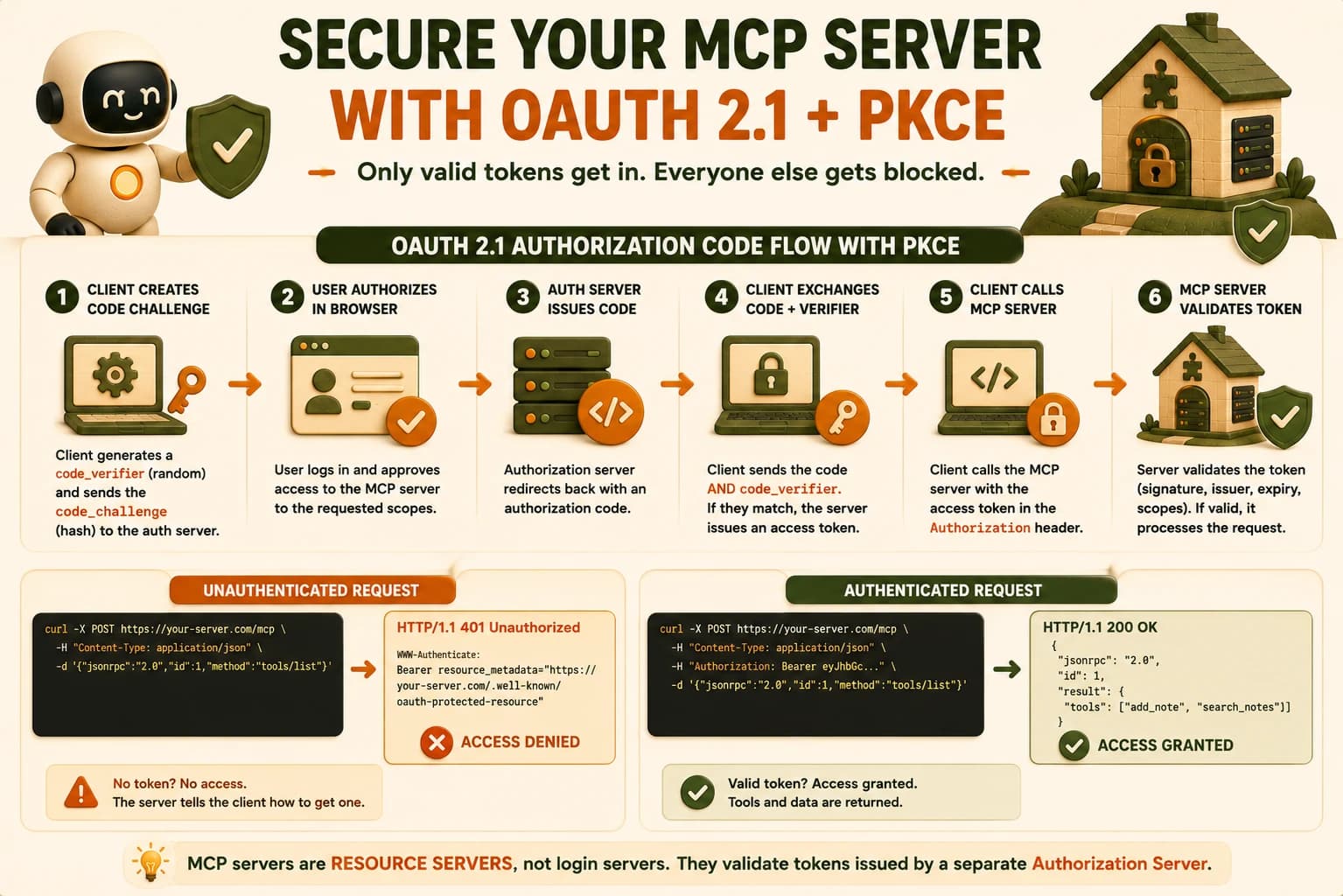
Second, PKCE moves from optional to mandatory, including for clients that could technically hold a secret. PKCE works by having the client generate a random code_verifier, hash it into a code_challenge sent with the initial authorization request, and then present the original code_verifier when it redeems the authorization code. The authorization server hashes that verifier and compares it to the challenge it received earlier; if they don't match, no token. That binds the whole exchange to the specific client that started it, which closes the authorization-code-interception attack that plain OAuth 2.0 left open for public clients like CLI tools, exactly what most MCP hosts are.
The Resource-Server Role: What Your Server Does (and Doesn't) Do
Your MCP server's job in this whole picture is narrow: validate tokens, never issue them. The spec makes MCP servers OAuth 2.1 resource servers, meaning a completely separate authorization server handles login, consent, and token issuance, and your server's only responsibility is checking whether a presented token is valid before it answers a request.
Concretely, a remote MCP server must expose a /.well-known/oauth-protected-resource endpoint, per RFC 9728, that tells a connecting client which authorization server issues valid tokens for this resource. When a client shows up with no token, or an invalid one, the correct response is an HTTP 401 with a WWW-Authenticate header pointing at that discovery document, not a silent failure and not a partial answer.
This split matters because it keeps your server's code simple. You're not writing a login page, a password reset flow, or a consent screen inside notes_server.py, you're writing one piece of logic: "is this token real, and is it still valid." Everything upstream of that is someone else's job, whether that's a hosted provider or an authorization server you run separately.
Adding OAuth + PKCE to notes_server.py
FastMCP's server-side auth wires a token verifier into the same FastMCP instance your tools already live on, and it doesn't touch add_note, search_notes, notes://all, or summarize_notes at all. The addition sits entirely at construction time.
from fastmcp import FastMCP
from fastmcp.server.auth.providers.jwt import JWTVerifier
from fastmcp.server.auth import RemoteAuthProvider

token_verifier = JWTVerifier(
    jwks_uri="https://your-auth-server.com/.well-known/jwks.json",
    issuer="https://your-auth-server.com",
)

auth = RemoteAuthProvider(
    token_verifier=token_verifier,
    authorization_servers=["https://your-auth-server.com"],
    base_url="https://your-notes-server.example.com",
)

mcp = FastMCP(name="Notes Server", auth=auth)
JWTVerifier handles the actual token checking: it fetches your authorization server's public keys from the jwks_uri, confirms the token's signature, checks it hasn't expired, and confirms the issuer matches who you expect issued it. RemoteAuthProvider wraps that verifier with the metadata a connecting client needs, including the /.well-known/oauth-protected-resource document from the previous section, generated for you automatically once auth= is set, per FastMCP's Remote OAuth documentation.
On the client side, the PKCE mechanics from earlier in this lesson are handled for you too, not something you hand-roll:
from fastmcp import Client
from fastmcp.client.auth import OAuth

oauth = OAuth(scopes=["notes:read", "notes:write"])

async with Client("https://your-notes-server.example.com/mcp", auth=oauth) as client:
    await client.list_tools()
OAuth(...) runs the full Authorization Code Grant with PKCE: it generates the code_verifier/code_challenge pair, opens a browser for you to authorize, exchanges the code for a token, and stores it for reuse. Nothing about add_note or search_notes changed, exactly the same as when you switched transports to Streamable HTTP: the capability stays fixed, and only the layer around it changes.
DCR vs Client ID Metadata Documents
Dynamic Client Registration lets a new client, like a fresh Claude Code install, register itself with your authorization server automatically and receive a client ID back, without a human pre-configuring anything. That sounds like exactly what a protocol meant to connect "any client to any server" needs, and for a while it was the spec's recommended answer.
It hasn't held up in practice. A May 2026 preprint that probed 119 testable OAuth-enabled remote MCP servers found dynamic client registration flaws in 96.6% of them, which is close to universal, not an edge case. That's why Client ID Metadata Documents, CIMD, have replaced DCR as the recommended default: instead of a runtime registration handshake that's proven hard to implement correctly, a client publishes a static metadata document at an HTTPS URL it controls, and that URL itself becomes the client ID. No registration endpoint to get wrong.
DCR vs CIMD: what actually changes
| Dimension | Dynamic Client Registration (DCR) | Client ID Metadata Documents (CIMD) |
|---|---|---|
| Who registers | Client registers itself at runtime via an API call | Client publishes a static file; no registration call happens |
| Spec status (2026) | Originally recommended; still supported | Now the recommended default |
| Real-world reliability | Flaws found in 96.6% of tested implementations (May 2026) | New enough to lack a comparable failure study, but structurally simpler |
| What you as server operator do | Run a registration endpoint (RFC 7591) | Trust a fetched metadata document instead |
For notes_server.py, this means favoring an authorization server or hosted provider that supports CIMD if you have the choice, and treating DCR support as "present but worth double-checking," not "solved."
Proving It: One Call That Succeeds, One That's Rejected
Config that you believe is working and config that's actually working are two different claims, and the only way to close that gap is to make both calls yourself. First, the call with no token, the exact request that worked before you added auth:
curl -X POST https://your-notes-server.example.com/mcp \
  -H "Content-Type: application/json" \
  -d '{"jsonrpc":"2.0","id":1,"method":"tools/list"}'
Before this lesson, that returned the full tool schema. After adding auth=, it should now return an HTTP 401 with a WWW-Authenticate header pointing at your /.well-known/oauth-protected-resource document, no schema, no note data, nothing. That response is the whole point: the door that used to swing open for anyone now asks for a badge first.
Then run the same call through the authenticated client from the previous section, and confirm tools/list returns exactly what it used to, add_note and search_notes both present with their full schemas. Two calls, one command apart, two different outcomes: that pairing is your actual evidence, not a line in a config file that says auth=True.
A real GitHub issue against FastMCP (PrefectHQ/fastmcp#972) reports OAuth working correctly through the MCP Inspector while failing silently against Claude Integrations using the same server. If your authenticated call succeeds in one client and not another, don't assume your server is broken, check whether the two clients are completing the OAuth flow the same way before you start debugging the token verifier.
Worth writing down plainly, for your own log: before this lesson, notes_server.py would return every note anyone had ever added and accept new ones from any caller on the internet with the URL, no verification of who was asking. That's the gap you just closed.
Auth solves who's allowed to call your server. A separate cost shows up once you're running several servers at once instead of just this one: loading their tools efficiently so their combined schemas don't eat your whole context window.
Your Lab
Confirm the gap
Run the unauthenticated curl command from this lesson against your live 18.09 server and confirm it still returns the full tool schema. This is your "before" evidence.
Add OAuth 2.1 with PKCE
In notes_server.py, add a JWTVerifier and RemoteAuthProvider as shown in this lesson, pointed at an OAuth 2.1 authorization server of your choice, and pass auth= to your FastMCP instance. Redeploy.
Demonstrate the rejection
Run the exact same unauthenticated curl command again and confirm it now returns an HTTP 401 with a WWW-Authenticate header. This is your "after" evidence.
Demonstrate the authenticated call
Connect with fastmcp.client.auth.OAuth and confirm tools/list succeeds and returns the correct schema. Commit both curl outputs, the client transcript, and a one-line note on what your server could do before you added auth, to learning-log.md.
Done? You've completed Lesson 18.10.
FAQ