Structured Outputs LLM: Pydantic, Zod & Validation
Structured outputs force an LLM to emit a schema-validated object instead of free text, so malformed data fails loudly instead of breaking your pipeline.

A lead-extraction agent runs fine in testing: fifty calls, fifty clean records. Ship it, and by the following week it's dropping records at a rate of maybe one in seventy. Nothing crashes. No error gets logged. The agent just occasionally decides a phone number belongs in the notes field instead of the phone field, and the record slides past every downstream check because, technically, the JSON was still valid.
Structured outputs solve this by forcing a model to emit a typed, schema-validated object instead of free text, so a malformed or mis-shaped response fails loudly at the boundary instead of quietly corrupting whatever reads it next. That's the whole idea: stop parsing hope out of prose, and start demanding a contract.
Key Takeaways
- JSON mode only guarantees valid syntax; structured outputs guarantee the response matches a specific schema, every time.
- There are two mechanically different ways to get there: constraining tokens during generation, or validating and retrying after generation.
- Claude's structured outputs are now natively supported through
output_config.format, replacing the older workaround of forcing a fake tool call.- A schema-valid object can still hold a wrong value; validation catches shape errors, not semantic ones, so libraries like Pydantic let you layer real checks on top.
- The right library depends on your setup: native support for a single provider, Instructor for multi-provider portability, Outlines for self-hosted models.
What Structured Outputs Actually Guarantee
Structured outputs guarantee that a model's response conforms to a schema you define, field names, types, and required fields included, rather than merely being syntactically valid JSON. Those are two very different promises, and conflating them is where most pipelines get into trouble.
"Respond in JSON" and "JSON mode" both check one box: is this text parseable? A model that returns {"full_name": "Jordan Lee"} when your code expects a name field passes that check and still breaks your webhook. Structured outputs add a second, stricter box: does this object actually match the shape my code is written against?
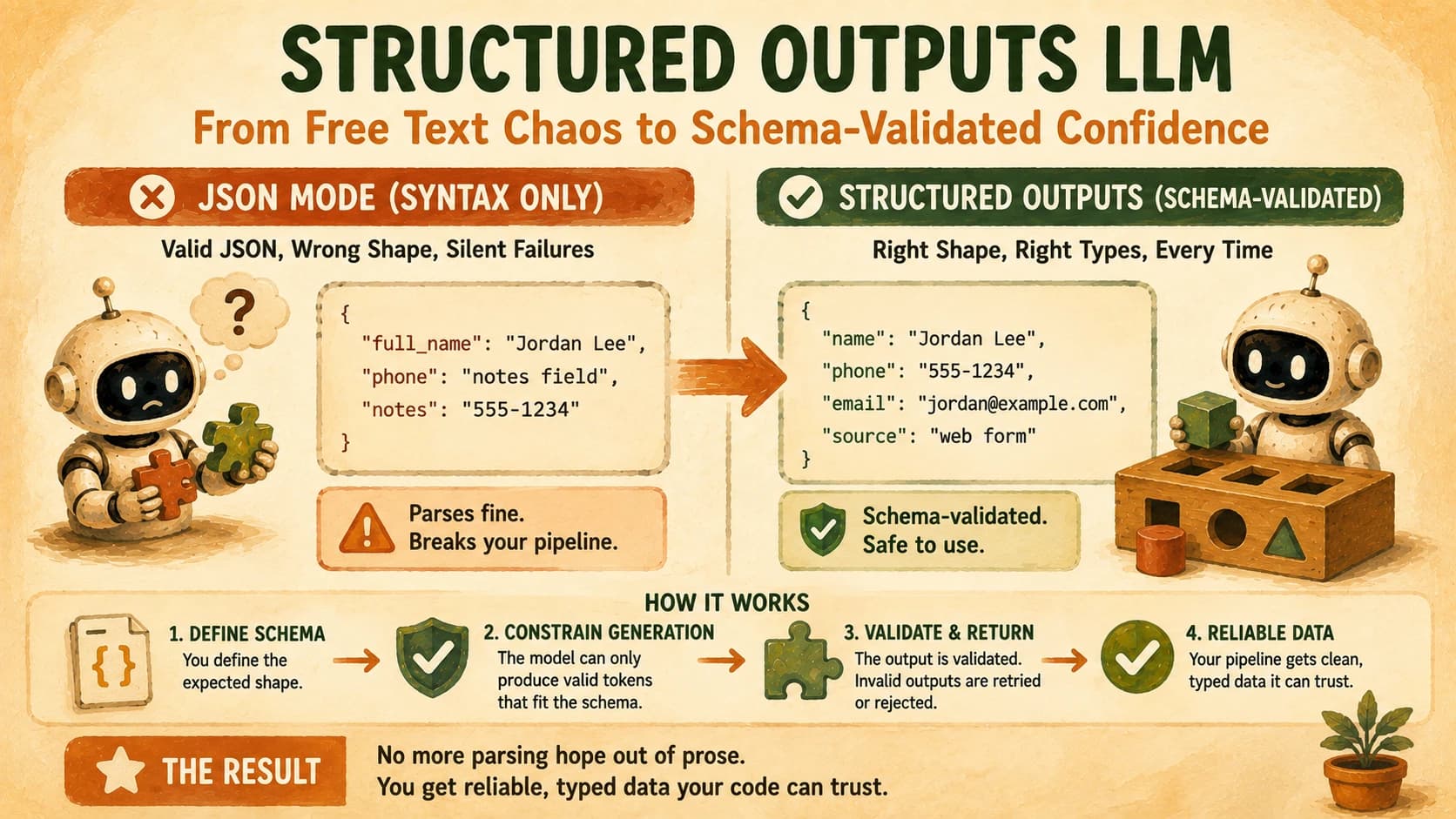
The mechanism behind that second guarantee is constrained decoding: the API doesn't just ask the model nicely to follow a shape, it restricts which tokens the model is even allowed to produce at each step, so an invalid structure is never generated in the first place. That's the piece that makes this reliable enough to build a pipeline on, instead of a suggestion you hope the model follows.
If you've already covered schema-driven prompting for a single response, this lesson is the next step up: making that same guarantee hold across an entire agent pipeline, not just one call.
Two Ways to Get There: Constrained Decoding vs. Validate-and-Retry
There are two mechanically distinct approaches to enforcing a schema, and knowing which one you're using changes how you debug a failure.
Constrained decoding works during generation by masking out any token that would violate the schema, so the model is physically unable to produce a malformed structure. XGrammar, the engine now used by default in vLLM, SGLang, and TensorRT-LLM as of early 2026, does this with under 40 microseconds of overhead per token, which is cheap enough that there's rarely a reason not to use it when it's available.
Validate-and-retry works after generation. The model produces a response as usual, a library like Instructor validates it against your Pydantic model, and if validation fails, the error gets sent back to the model with instructions to try again. This is slower and less absolute than constrained decoding, since the model could in theory exhaust its retries, but it works across any provider and lets you layer in checks a grammar can't express, like "this end date must be after this start date."
A schema-valid response and a correct response aren't the same thing. Constrained decoding stops a model from emitting {"age": "thirty"} when your schema wants an integer. It does nothing to stop the model from emitting {"age": 30} for someone whose real age is 45. Shape and truth are different problems, and only the second one needs actual validation logic, not just a schema.
Defining the Contract: Pydantic, Zod, and Raw JSON Schema
A JSON Schema is the underlying contract every one of these tools compiles down to, but you rarely write it by hand. Pydantic in Python and Zod in TypeScript let you define that same contract as a class or type, which is faster to write and stays in sync with the rest of your code.
Here's the same contract that would extract a lead from a chat transcript, defined as a Pydantic model:
from pydantic import BaseModel, EmailStr

class Lead(BaseModel):
    name: str
    email: EmailStr
    wants_demo: bool
The same contract in TypeScript, written with Zod:
import { z } from "zod";

const Lead = z.object({
  name: z.string(),
  email: z.string().email(),
  wantsDemo: z.boolean(),
});

type Lead = z.infer<typeof Lead>;
Both compile to the same JSON Schema and both give you a parse step that throws on bad data. The practical difference is the runtime you are already in, not the feature list.
Pydantic vs Zod at a glance
| Pydantic | Zod | |
|---|---|---|
| Language | Python | TypeScript / JavaScript |
| Schema is | A class inheriting BaseModel | A value built from z.* combinators |
| Static types | Native, from the class itself | Inferred with z.infer<typeof Schema> |
| Validation call | Lead.model_validate(data) | Lead.parse(data) |
| On failure | Raises ValidationError | Throws ZodError, or returns a result with .safeParse() |
| Custom rules | @field_validator methods | .refine() and .superRefine() |
| JSON Schema export | Lead.model_json_schema() | Via zod-to-json-schema |
| Used by | Instructor, most Python LLM SDKs | Vercel AI SDK, most TypeScript LLM SDKs |
Pick the one that matches your stack. There is no meaningful quality gap between them, and choosing the one your codebase is not written in costs you a language boundary for no benefit. The only time the choice is genuinely open is a polyglot service, and even then the library should follow whichever side owns the validation step.
One real asymmetry worth knowing: Zod's .safeParse() returns a success flag instead of throwing, which fits a retry loop more naturally than wrapping every call in try. Pydantic needs an explicit try around model_validate, which is a small amount of extra code in the validate-and-retry pattern described above.
That class is the same discipline covered in designing good tools for an agent applied to the other side of the conversation: instead of describing what the agent is allowed to send in, you're describing exactly what you'll accept back. A vague tool description gets the wrong tool called; a vague output contract gets a technically-valid object your code can't actually use.
Claude's Native Structured Outputs
Claude now supports structured outputs natively through the output_config.format parameter, which constrains the model's final response to a JSON Schema you provide, instead of relying on the older trick of forcing a fake tool call just to get JSON-shaped output.
The older method, still common in tutorials, defines a tool whose input_schema describes your desired shape and then sets tool_choice to force the model to call it, reading the structured data back out of the tool_use block. It works, but it repurposes a mechanism built for something else. Native structured outputs are more direct:
response = client.messages.parse(
    model="claude-sonnet-5",
    max_tokens=1024,
    messages=[{"role": "user", "content": "Extract the lead info from this message."}],
    output_format=Lead,
)
One real limitation worth knowing before you design a schema around it: Claude's structured outputs don't currently support numeric or string-length constraints like minimum or maxLength directly in the schema. The official Claude structured outputs documentation covers the full list of supported and unsupported JSON Schema keywords, and it's worth a read before you assume a constraint you wrote is actually being enforced at generation time rather than silently dropped.
Instructor and Outlines: Where Each One Fits
Instructor and Outlines solve the same underlying problem from opposite ends, and picking between them comes down to whether you control the model.
Instructor sits on top of whatever provider you're calling, wrapping the request-response cycle in a validate-and-retry loop: define a Pydantic model, pass it as response_model, and if the returned object fails validation, Instructor automatically sends the error back to the model and asks it to correct itself. The Instructor documentation lists support for over fifteen providers through one interface. That's the real reason to reach for it: the same Pydantic model works whether you're calling Claude, OpenAI, or a local Ollama model, without rewriting your extraction logic for each one.
Outlines takes the constrained-decoding approach and makes it available for models you're running yourself. It builds a finite-state machine over the model's vocabulary so that, like Claude's native structured outputs, invalid tokens are masked out during generation rather than corrected afterward. That only works when you have direct access to the model's token-generation loop, which is why Outlines is the choice for self-hosted open-source models rather than for calls to a hosted API.
Reach for the wrong one and you'll feel it fast: point Instructor at a self-hosted model with no native structured-output support and you're paying for retries on a model that was never going to get it right without token-level constraints in the first place. Point Outlines at a hosted API and there's no token loop to hook into at all.
Your Lab: Force a Validated Object, Then Break It On Purpose
Define the extraction schema
In Cursor or Claude Code, create a lead_schema.py file with a Pydantic model for extracting a lead from messy chat text: name (string), email (string, must contain @), budget (integer, must be positive), and wants_demo (boolean). Add a custom validator on email that rejects anything without an @ sign, since a bare type hint alone won't catch that.
Wire it to a real call
Have your agent call Claude with output_config.format (or Instructor's response_model, if you're testing multi-provider portability) set to your schema. Run it once against a clean input: "Hi, I'm Jordan, jordan@example.com, budget's around 5000, yes I'd love a demo." Confirm you get back a validated Lead object, not a raw string.
Feed it five malformed inputs
Run the same pipeline against these five inputs, each broken a different way: (1) no email address at all, (2) an email missing the @, (3) a budget written as the word "unclear" instead of a number, (4) a message with no wants_demo signal either way, (5) a budget given as -500. For each one, log whether the pipeline raised a validation error before the bad data reached anything downstream, or let it through.
Commit the results
In learning-log.md, record all five outcomes. If any of the five silently passed, that's not a passing lab, it's a gap in your schema, fix the validator and re-run until all five are caught. Commit the schema file and the log together.
I ran a version of this same test on an early extraction agent, and the one that got through wasn't the email or the budget. It was a wants_demo field the model just guessed as true when the transcript never said either way.
The schema was satisfied. The data was invented. That's the exact failure a type check can't catch and a written-out validator can, which is the entire point of doing this by hand once instead of trusting the shape alone.
Done? You've completed Lesson 17.06.
FAQ