What Is CLAUDE.md? Claude Code's Memory File, Explained
CLAUDE.md is the markdown file Claude Code reads every session, here's what belongs in it, why bloat backfires, and how to keep it lean.

You open a fresh Claude Code session on a project you've worked in for weeks, and the first thing you do is retype the same three lines you typed yesterday: run npm test, not pytest, and never touch the legacy/ folder. That's the third time this week you've re-explained something Claude Code could have just remembered.
CLAUDE.md is a plain markdown file, placed in your project's root folder, that Claude Code reads automatically at the start of every session and keeps loaded for the whole conversation. It's the simplest form of durable memory an agent can have: not a database, not a vector store, just a file the agent is guaranteed to read before it does anything else.
Key Takeaways
- CLAUDE.md is a plain markdown file Claude Code reads automatically every session, no setup required beyond creating it.
- It should hold facts you'd otherwise re-explain: build commands, conventions, folder layout, and "always/never" rules.
- Anthropic's own guidance targets under 200 lines per file, because longer files consume more context and reduce how consistently Claude follows them.
- A bloated CLAUDE.md is context rot you inflicted on yourself: the same accuracy-degrading effect covered in the context rot lesson, except this time you wrote every line of the bloat.
What Is CLAUDE.md?
CLAUDE.md is a markdown file, plain text, that gives Claude Code standing instructions for a project: it's read at the start of every session and stays in context for the whole conversation, so you don't have to repeat yourself. You met a five-line version of this file back in Claude Code as an Agentic Terminal, where the goal was just to prove Claude Code reads it. This lesson treats it as what it actually becomes on a real, ongoing project: a maintained artifact with a budget, not a one-time setup step.
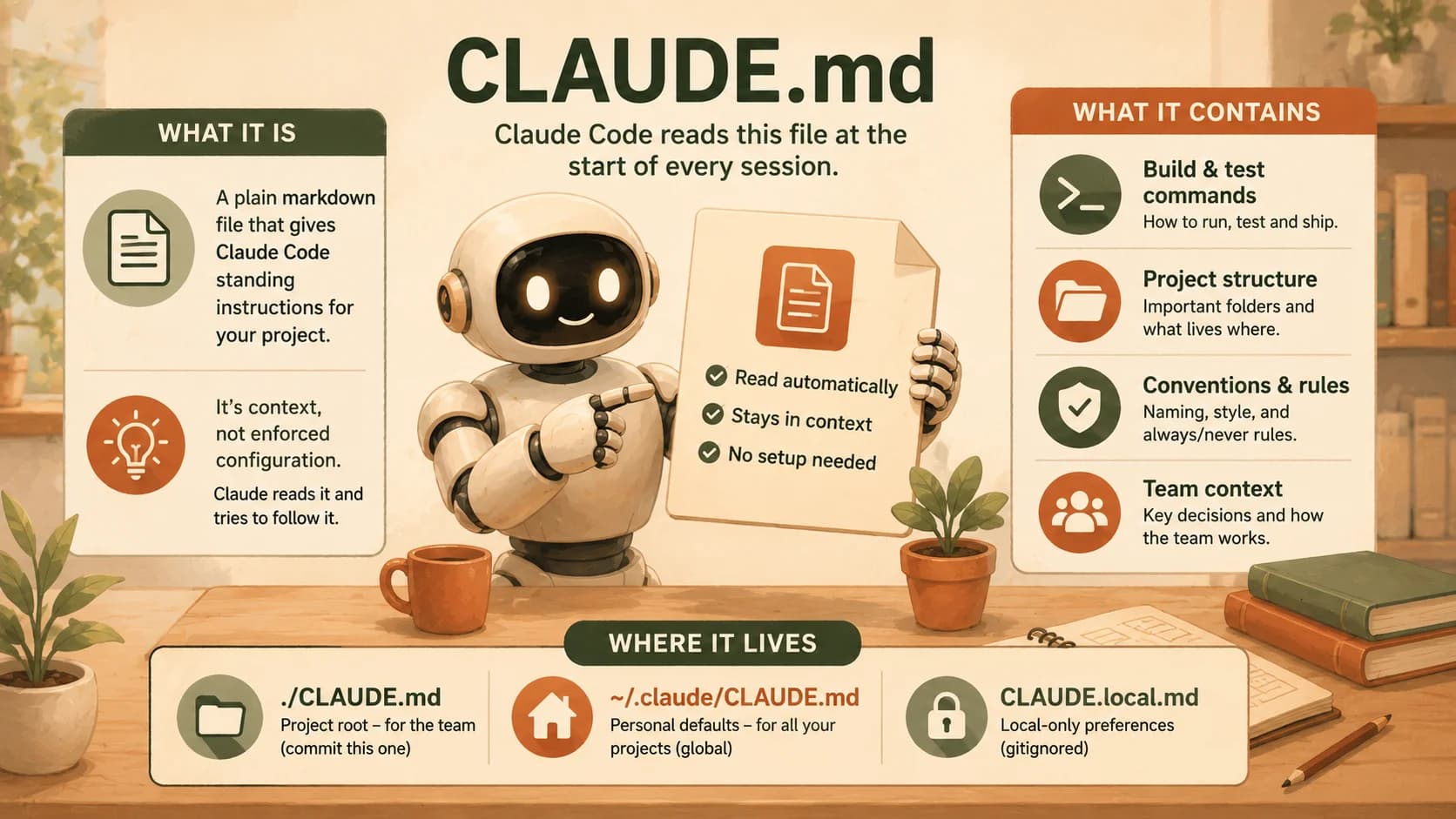
The file lives at your project root (./CLAUDE.md), though Claude Code also supports a personal version at ~/.claude/CLAUDE.md that applies across every project on your machine, and a gitignored CLAUDE.local.md for preferences you don't want to commit, like your own local test URLs. All of these get concatenated into context at session start. The next lesson, on the CLAUDE.md hierarchy, goes deeper into how multiple files layer together; for now, the project-root file is the one that matters. If you also work in Cursor, the same idea shows up there as Cursor rules and the AGENTS.md standard, so the memory you build doesn't stay locked to one editor.
Claude treats CLAUDE.md as context, not as enforced configuration. That distinction matters more than it sounds like it should: the file is delivered as part of your conversation, the same way a message you typed would be, so Claude reads it and tries to follow it, but nothing forces compliance the way a permission setting would. That's exactly why how you write the file, and how much of it there is, changes whether it actually works.
What Actually Belongs in It
The test for whether something belongs in CLAUDE.md is simple: would you have to re-explain this to a fresh session if it weren't written down? If yes, it earns a line. If Claude could figure it out by reading your code, it doesn't.
What earns a place:
- Real commands, the exact test, lint, and build commands for this project, not generic advice like "run the tests"
- Project layout, where things actually live, if it's not obvious from folder names alone
- Conventions that differ from the tool's defaults, your indentation, your naming pattern, your preferred error-handling style
- One or two hard rules, a folder Claude should never touch, a command it should never run without asking first
What doesn't earn a place: a full directory tree Claude can generate itself with one ls, a list of every dependency in your package.json, or a paragraph explaining what a REST API is. None of that is information Claude is missing. Writing it down anyway is exactly how a lean file turns into a bloated one.
The Size Budget Nobody Enforces
Every CLAUDE.md file has an unofficial size limit, and almost nobody treats it that way. Claude Code's own documentation is specific here: target under 200 lines per file, because longer files consume more context and reduce how consistently Claude follows the instructions inside them.
That's the piece most tutorials skip past on their way to teaching you how to write one. A CLAUDE.md file loads into every single session, whether or not that session needs half of what's in it.
The moment it grows past what's genuinely load-bearing, you've built yourself a smaller, self-inflicted version of the same problem. A file that's always in context, quietly competing with your real instructions for the model's attention, on every turn, in every session, until someone prunes it.
Don't start by writing the 200-line version and trimming down. Start at 20 to 30 lines, and add a new rule only the moment you catch yourself repeating a correction Claude has already gotten wrong once. That habit alone keeps most CLAUDE.md files well under budget without you ever having to do a dedicated cleanup pass.
The statelessness problem is why this file exists at all: every session starts blank, and CLAUDE.md is one of the cheapest ways to hand a fresh session real project knowledge without re-explaining it by hand. But "cheap" only holds if the file stays small. A 400-line CLAUDE.md isn't free memory anymore, it's a tax you pay on every session, whether that session needed the information or not.
Lean vs. Bloated, in Practice
The gap between a lean and a bloated CLAUDE.md isn't theoretical, and you don't have to take anyone's word for it: it's directly observable the first time you run the same task against both versions of the same file. I've watched a bloated CLAUDE.md make an agent second-guess a rule stated plainly on line four, simply because forty lines of unrelated architecture notes sat between the instruction and the moment it mattered. A lean file doesn't have that problem, because there's nowhere for the important line to hide.
The practical difference shows up in three places when you compare them side by side on the same task:
- Speed to first correct action. A lean file gets the right command run immediately. A bloated one often has Claude ask a clarifying question the answer was already sitting somewhere inside its own context, just buried.
- Rule adherence. A "never touch
legacy/" rule on line six of a 20-line file gets followed. The same rule at line 180 of a file stuffed with dependency lists is competing with everything above it for attention. - Tokens spent before the real work starts. Every line of CLAUDE.md is tokens spent before your actual prompt, on every session, whether or not that session touches the part of the project the extra lines describe.
None of this means CLAUDE.md is fragile. It means it's a maintained artifact, the same way you'd maintain a README, and it rewards the same discipline: prune what's stopped being true, and cut what never needed to be there.
Your Lab
Write a lean CLAUDE.md for a real repo
Pick a real project (yours, or the starter repo from earlier lessons). Write a CLAUDE.md under 30 lines: one project description, your actual build/test/lint commands, your real folder layout, one convention, and one hard "never" rule. No filler, no directory dump.
Run the same task against a deliberately bloated version
Duplicate your lean file, then pad the duplicate to 150+ lines by adding a full dependency list, a paragraph-length architecture history, and a handful of generic best-practice reminders Claude doesn't need. Ask the same real question in two fresh sessions, one per file, for example: "what's the lint command, and can you touch the folder I said never to touch?"
Compare and commit the result
Note which session answered faster, which one respected the "never" rule without hesitation, and roughly how much longer the bloated response took to get there. Commit both CLAUDE.md files and your side-by-side comparison to learning-log.md.
Done? You've completed Lesson 19.06.
FAQ