What Is an Agentic Workflow? Prompting vs the Loop
What is an agentic workflow? It's a loop: the model plans, acts, reads the actual result, and decides its next step, instead of answering once.

Your discount function returns 2.67. The test wants 2.68. You paste both files into a fresh chat, write a careful prompt, and get back a confident, clean-looking fix. You run the tests again. Still 2.67.
An agentic workflow is a loop. The model plans a step, acts by calling a tool, observes the actual result, and uses what it saw to choose its next move, repeating until the goal is met. A prompt is one round trip. You ask, it answers, and nothing in that exchange ever checks whether the answer worked.
Key Takeaways
- An agentic workflow is a loop, plan, act, observe, decide again, not a longer or cleverer prompt
- A single prompt is stateless, so it cannot read the result of its own output, which is why it fails tasks that depend on what happens after step one
- The test for any system is who decides the next step: you, the developer's code, or the model
- Loops cost more in time and tokens than a single call, so most tasks should still be one prompt
What Is an Agentic Workflow?
An agentic workflow is a repeating cycle in which a model plans an action, executes it through a tool, reads the real result, and decides what to do next based on that result, continuing until the task is done or it gives up. The loop is the whole idea.
Four things happen on every lap, and each one has a name you will see everywhere in this path:
- Plan the next single step, given everything known so far
- Act by calling a tool: read a file, run a command, search the web
- Observe what actually came back, including errors
- Decide whether the goal is met, and if not, plan again with the new information
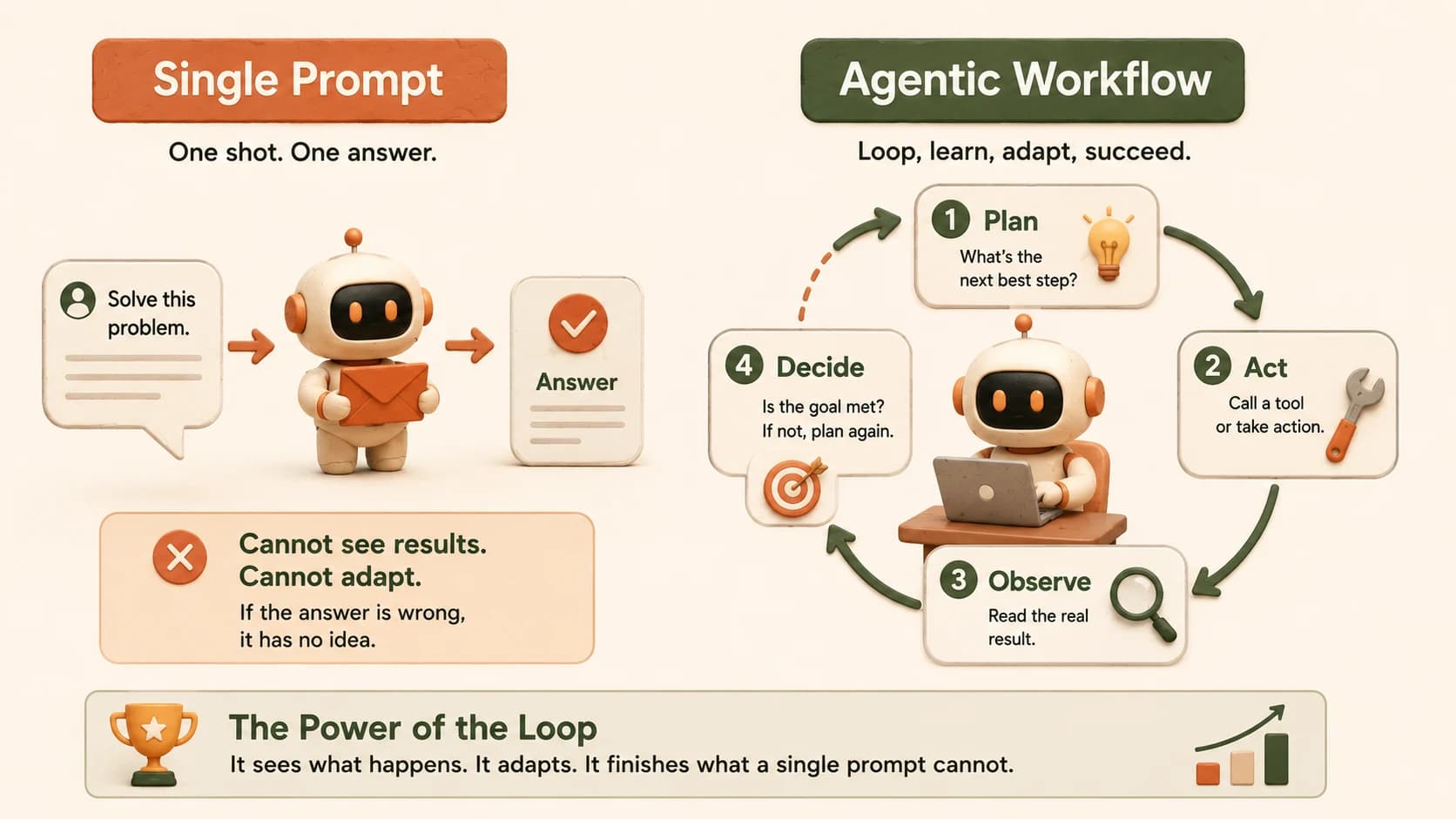
Getting this shape wrong is expensive in a specific way. When an agent misbehaves, your first question is always which phase broke: did it plan a bad step, call the wrong tool, or misread a result that was sitting right there? If you think of the whole thing as one big prompt, you have no phases to check. So you spend an afternoon rewording instructions, and the actual problem was that nothing in the chain was reading the output at all.
Why a Single Prompt Hits a Ceiling
A single prompt hits a ceiling because it's stateless: the model produces text and then the exchange ends, with no mechanism for seeing whether that text did what it was supposed to do. It's not a reasoning limitation. It's a plumbing one.
Here's a task where that gap becomes visible in about ninety seconds. A tiny pricing helper, with a test suite that catches one real edge case:
# discount.py
def apply_discount(price, percent):
    return round(price - price * percent / 100, 2)
# test_discount.py
from discount import apply_discount

def test_simple():
    assert apply_discount(100.00, 10) == 90.00

def test_cents():
    assert apply_discount(19.99, 10) == 17.99

def test_half_cent_rounds_up():
    assert apply_discount(5.35, 50) == 2.68
Two of those pass. The third fails. 5.35 * 50 / 100 is 2.675 in decimal, but once it's stored as a binary float it lands a hair below 2.675, so Python's round() sends it down to 2.67 instead of up to 2.68. This is documented behavior, not a bug, and it catches experienced developers regularly. The Python docs explain the representation issue in detail.
Now notice what a single prompt is being asked to do here. To fix this correctly, you have to know which test fails and what the actual failure message says. A one-shot prompt has to guess that, and a guess that looks right is the worst possible outcome, because you'll accept it. Better prompt wording doesn't close this gap, which is why the fix is a different shape rather than a better sentence. If the prompting side of this is still fuzzy, Beyond the Prompt covers prompt fundamentals properly and this path won't repeat them.
The Same Task, Run as an Agentic Workflow
Run the same task as an agentic workflow and the failure stops being invisible, because something in the cycle actually executes pytest and reads what comes back. That single change, from producing an answer to checking an answer, is the entire difference.
Give Claude Code the same folder and one instruction: "make pytest pass here, and run the tests yourself after each change." The trace looks like this:
$ pytest
test_discount.py::test_simple PASSED
test_discount.py::test_cents PASSED
test_discount.py::test_half_cent_rounds_up FAILED
E   assert 2.67 == 2.68
That assert 2.67 == 2.68 line is the observation the one-shot version never got. With it in hand, the next lap has something the first lap did not: evidence that the problem is rounding direction on a specific value, not arithmetic. The fix it lands on switches to decimal arithmetic with explicit half-up rounding, then runs the suite again to confirm.
I built this lab expecting the one-shot prompt to fail loudly. It didn't. It handed back a tidy round() variant that passed two of the three tests, and the only reason I knew it was wrong is that I ran pytest myself and saw assert 2.67 == 2.68. Quiet wrongness is the real failure mode, and it's exactly what an observe step is for.
There is a research version of this same result. On OpenAI's HumanEval coding benchmark, GPT-3.5 scored 48.1% answering zero-shot but reached up to 95.1% wrapped in an agent loop, beating GPT-4's 67.0% zero-shot score. Treat those numbers as historical: they are 2024 models on a 2024 benchmark, and today's models score far higher on both sides. The finding that survives is the shape. A weaker model that can check its own work outperformed a stronger model that could not.
You have already watched this happen, incidentally. The permission prompts you approved in the loop you already ran were act steps, and the file contents that came back were observations.
Prompt, Workflow, or Agent? One Question Tells You
One question separates all three: who decides what happens next? If you decide, it's a prompt. If the developer's code decided in advance, it's a workflow. If the model decides at runtime, it's an agent.
Anthropic draws the same line in its engineering guide. Workflows are "systems where LLMs and tools are orchestrated through predefined code paths," while agents are "systems where LLMs dynamically direct their own processes and tool usage". Worth memorizing, because the whole path uses that vocabulary, and the next lesson turns it into a repeatable test you can run on any system you meet.
Prompt, workflow, and agent compared
| Prompt | Workflow | Agent | |
|---|---|---|---|
| Who decides the next step | You, every time | The developer, in advance | The model, at runtime |
| Sees its own results | No | Only where the code checks | Yes, every lap |
| How many steps | One | Fixed at build time | Unknown until it stops |
| Typical failure | Confidently wrong answer | Real input doesn't fit the path | Loops, stalls, or drifts off task |
The dismissive version of this goes around regularly: "oh wow, they invented a for loop." Fair, and true. Structurally it's a loop. What makes it worth a new word is that the body of the loop isn't fixed. A for loop repeats the same instruction; this one gets to read what came back and pick a different instruction because of it. That's a small mechanical change with a large practical consequence, which is roughly the story of every useful abstraction in software.
Misreading which of the three you're holding wastes real hours. Treat a fixed workflow as an agent and you'll tune prompt wording all afternoon when the fix was a branch nobody wrote. Treat an agent as a workflow and you'll keep adding rules to a system that was always free to reorder them.
One more thing worth holding onto: "agentic" isn't a badge a system either has or lacks. Hand more of the sequence to the model and the system becomes more agentic. Hand over less and it becomes less so. That dial is a lesson of its own later in this module.
When a Prompt Is Still the Right Answer
Most tasks should still be a single prompt, and reaching for a loop by default is the most common beginner mistake in this whole field. Anthropic's own guidance is to find "the simplest solution possible, and only increasing complexity when needed", noting that agentic systems trade latency and cost for task performance. That judgment call gets its own full lesson later in this module: when not to use AI agents.
Three costs come with the loop, and you feel all of them:
- Latency. Ten laps means ten model calls plus ten tool executions. A prompt answers once.
- Cost. Every lap re-sends the accumulated context, so token spend grows faster than the number of steps.
- Compounding error. Each autonomous step is another chance to go wrong, and a loop that misreads its own observation can spiral without recovering.
If you can verify the answer at a glance and nothing about step two depends on step one, a loop is pure overhead. Draft an email, summarize a document, explain an error message: all one round trip.
The useful skill isn't preferring loops. It's recognizing the tell: does finishing this task require seeing a result you can't know in advance? Running tests, reading an API response, checking whether a file exists.
If yes, no amount of prompt polish will get you there. If no, keep it simple. The rest of the agentic AI library assumes you can make that call.
Your Lab
Run the same task twice, once as a single prompt and once as an agentic workflow, then write down the difference you saw. You won't need to invent anything or ask an AI to generate it for you: every file is already in this lesson.
Set up the folder
Create a new folder called discount-lab and open it in Cursor. Add the two files exactly as written in the "Why a Single Prompt Hits a Ceiling" section above: discount.py and test_discount.py. If pytest isn't installed, run pip install pytest.
Run the tests yourself and record the failure
In the terminal, run pytest. Copy the failing line into a scratch note. You should see assert 2.67 == 2.68 on test_half_cent_rounds_up. Save a copy of discount.py somewhere outside the folder now, because you'll need the original back in step 4.
Try it as one prompt
Open a fresh chat in Cursor's Ask mode, paste the contents of both files, and ask for a fix in a single message. Don't let it run anything and don't paste the test output back to it: the moment it sees a real result, it stops being a one-shot prompt and the comparison is spoiled. Paste its answer into discount.py, then run pytest yourself. Record whether it passed.
Try it as an agentic workflow
Put the original discount.py back from the copy you saved in step 2. In the terminal, run claude, then give it one instruction: "Make pytest pass in this folder. Run the tests yourself after each change." Watch which files it reads, when it runs the suite, and what it changes after seeing the failure.
Write the delta
In learning-log.md, write 100 words on exactly what the loop did that the prompt could not. Name the specific piece of information the loop had access to and the prompt did not. Commit the file.
The one-shot round will sometimes guess correctly and land on decimal arithmetic on its own. That doesn't undermine the lab, it sharpens it: write that outcome in your log too, and note that it guessed rather than verified. A correct guess and a checked result look identical on the page and aren't the same thing.
Done? You've completed Lesson 15.01.
FAQ