Why So Many Builders Run Claude Code Inside Cursor
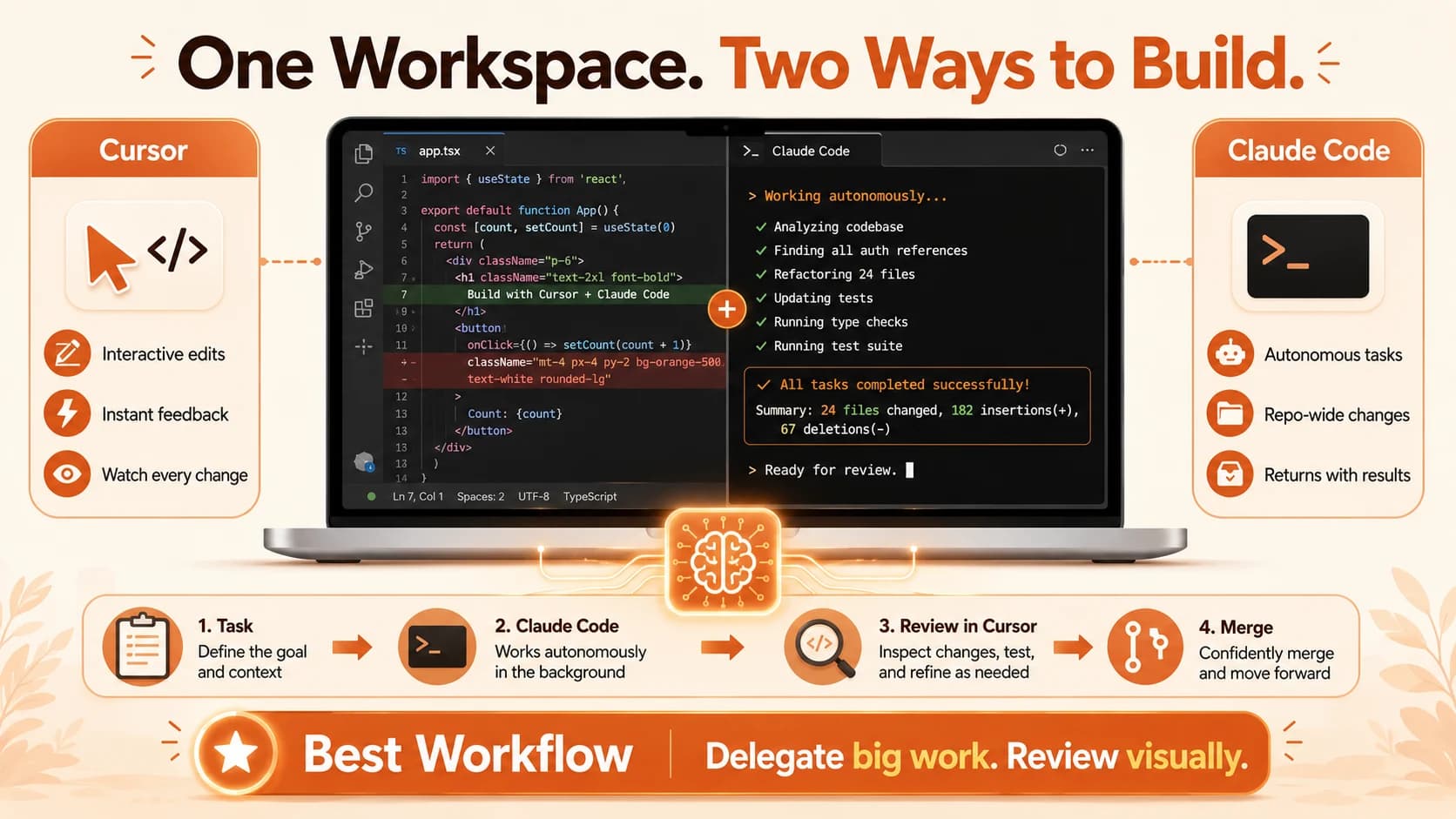
Developers install Claude Code inside Cursor because it splits one job in half: Cursor edits live, Claude Code works autonomously in the background.

Open Cursor's extension marketplace, search "Claude Code," and you'll find an official listing published by Anthropic. That's the whole trick behind one of the more interesting habits among working developers in 2026: instead of picking a side in the "Cursor or Claude Code" debate, they install both, in the same window, and route tasks between them all day.
Builders run Claude Code inside Cursor because the two tools split one job into two halves it's good at doing separately. Cursor stays the visual cockpit for edits you want to watch happen live. Claude Code becomes the autonomous half, handling the multi-file refactor or test suite you'd rather hand off and check later. This isn't a "which one wins" question, that's covered in our fuller decision guide. This is about why running both at once, in one editor, turns out to be less clunky than it sounds.
Key Takeaways
- Anthropic ships an official Claude Code extension that installs directly into Cursor, since Cursor is a VS Code fork
- The extension and the CLI share the same conversation history, so a session started in the sidebar can be resumed from the terminal with
claude --resume- The
--worktreeflag runs isolated, parallel Claude Code sessions that share git history but never edit the same files at once- Cursor reads
.cursorrulesand Claude Code readsCLAUDE.md, keeping both in sync is the single most important setup step- Builders report combined subscription costs around $40 a month for running both tools together
Two Tools, Two Jobs
Cursor and Claude Code aren't competing for the same job, they split it. Cursor is advanced cruise control, you stay in the driver's seat. Claude Code is closer to a self-driving car, you brief it and it takes the wheel.
Cursor's strength is staying visible while you work: tab completions that read your intent, inline-edit modes you can accept or reject line by line, and fast exploration of a repo you don't know yet. It's built for amplifying speed you're already applying yourself.
Claude Code's strength is disappearing into the background and coming back with results. You describe the destination, an auth refactor, a new test suite, a repo-wide rename, and it takes it from there. It reads across the codebase, edits the files that need editing, runs the tests, and reports what changed. It's built for work you'd genuinely rather delegate than babysit.
Most builders who've used both for more than a few weeks land on the same split: Claude Code for autonomous, multi-file work, Cursor for interactive editing and quick review. Not a preference. A division of labor.
Mix that up and both tools get worse at their job. Hand a repo-wide refactor to Cursor's inline agent and you're sitting there accepting or rejecting hundreds of small diffs one at a time. Hand a one-line typo fix to Claude Code and you're waiting on a permission prompt for something you could've typed yourself in two seconds. One widely-cited 2026 comparison puts it plainly: rather than debating which is better, experienced developers keep subscriptions to both, at a combined cost of roughly $40 a month.
Why Running Both Together Actually Works
Running two agents in one window sounds like it should feel cluttered. In practice it doesn't, for three specific, mechanical reasons rather than anything aesthetic:
- The extension shares the same engine as the CLI, not a lighter version of it
- Sessions carry over between the sidebar and the terminal instead of resetting
- Parallel agents run in isolated worktrees, so they don't collide on the same files
The extension is the same engine, not a lighter version of it. Anthropic's own Claude Code documentation confirms the extension installs into Cursor directly (it's a VS Code fork, and the extension supports "other VS Code forks" by design), and that it shares your CLAUDE.md settings, hooks, and MCP servers with the standalone CLI. Nothing about running it inside Cursor is a stripped-down mode. You gain a side-by-side diff view and the ability to @-mention exactly the code you've selected, without losing anything the terminal version does.
Sessions carry over instead of resetting. The extension and the CLI share the same conversation history. Start a conversation in Cursor's side panel, then run claude --resume in any terminal, and you can pick that exact session back up, full context intact. That single detail is why switching between the GUI and the terminal doesn't feel like starting over.
Parallel agents don't have to collide. A common setup pairs the extension in the sidebar with the Claude Code CLI running in Cursor's integrated terminal, two sessions working on separate things at once. For genuinely parallel work on the same repo, Claude Code's official --worktree flag starts a session in an isolated git worktree with its own files and branch. It still shares git history with your main checkout, but it never steps on another session's edits.
I've had a Claude Code session running a full refactor across a dozen files in the terminal while I tab-completed a small component change in Cursor's editor two tabs over. Both were touching the same repo at the same time, and neither was aware of or blocking the other. That's the actual payoff: not one tool replacing the other, but two sessions doing genuinely different work at the same time.
How to Install Claude Code Inside Cursor
Getting the extension running takes a few minutes, and the steps come straight from Anthropic's own install path rather than a workaround.
Open Cursor's Extensions view
Press Cmd+Shift+X (Mac) or Ctrl+Shift+X (Windows/Linux), then search "Claude Code." Look for the listing published by Anthropic, extension ID anthropic.claude-code.
Install and sign in
Click Install, then open the panel (a Spark icon appears in the editor toolbar once a file is open) and sign in with your Claude account. Any paid Claude plan works; no separate API key is required.
Position the panel where you want it
Drag the Claude panel to the secondary sidebar, the primary sidebar, or the editor area as its own tab. Cursor remembers your preferred location after the first move.
Install the standalone CLI too, if you want the terminal
The extension bundles its own private copy of the CLI just for the chat panel, it does not add claude to your shell PATH. If you also want to run claude from Cursor's integrated terminal, install the standalone CLI separately.
Some Cursor versions have shipped with extension quirks: duplicate Activity Bar icons or pinning that doesn't stick. If the panel misbehaves, "Developer: Reload Window" from the Command Palette resolves most of it.
The One Setup Detail That Makes It Click
If you only take one practical tip from this article, make it this one. Cursor's behavior is shaped by .cursorrules. Claude Code's behavior is shaped by CLAUDE.md. If the two disagree, you get genuinely inconsistent results depending on which agent happens to answer, the fastest way to make a dual setup feel schizophrenic instead of coherent.
I ran into this directly on a project where .cursorrules said "always write tests first" but an older CLAUDE.md never mentioned testing at all. Cursor's tab completions kept nudging toward test-first code; a Claude Code session handling a refactor in the same repo skipped tests entirely, because nothing told it not to. Same repo, two contradictory habits, purely because the two files had drifted apart.
Mirror your rules across both files: same tone, same constraints, same "explain why, not just what." Do this once and the two tools start behaving like one coherent teammate instead of two agents with different opinions about your codebase.
When to Reach for Which
Once both are installed, the decision in the moment usually comes down to three questions: how involved do you want to be, how many files does the task touch, and what kind of review do you actually want to do afterward.
Choosing between Cursor and Claude Code for a given task
| Question | Favors Cursor | Favors Claude Code |
|---|---|---|
| How involved do you want to be? | Watch each edit live | Delegate, review after |
| How many files does the task touch? | One or two | Many, across the repo |
| What kind of review do you want? | Line-by-line visual diff | A read-through of a text summary |
The tell is simple: if you'd want to look over the AI's shoulder for every single edit, that's a Cursor job. If you'd rather brief it and check the result once, that's Claude Code. Get this backwards often enough and you end up either babysitting a tool built to run unattended, or waiting on a tool built for instant feedback.
What Actually Breaks (the Honest Part)
Most write-ups of this setup make it sound seamless. It mostly is, but not entirely, and pretending otherwise just means you hit the rough edges with no warning.
Extension stability inside Cursor specifically has been inconsistent across versions. Cursor's own community forum documents duplicate icons in the Activity Bar, panels that won't stay pinned, and a secondary sidebar that doesn't support the panel at all. None of these are dealbreakers, but expect the occasional window reload rather than a flawless first install.
The other real friction is cost creep, not from the tools themselves but from running two agents loosely instead of deliberately. Two sessions editing the same file without a worktree between them can produce conflicting changes neither agent knows about. Use --worktree for anything genuinely parallel, and the collision risk mostly disappears.
The Bigger Point
None of this is a temporary workaround while the tools mature. The frontier of a coding tool in 2026 isn't really the underlying model. The same model behaves differently depending on the harness wrapped around it, what tools it can call, how permissions work, how context gets managed. Cursor and Claude Code are two different harnesses tuned for two different modes of working. Running them together just means you're not forced to pick one mode for every task on the table.
So the honest answer to "Cursor or Claude Code" is: both. Running Claude Code inside Cursor, kept in sync, means each tool does the half of the job it's actually built for.
FAQ