What Is a Context Window? Why AI Chats Have a Memory Limit
A context window is the maximum text an AI model can read and reason over at once, measured in tokens. Here's what that limit actually means for you.

Twenty messages into a conversation, you ask the AI to recall something you mentioned near the start. It can't. Not because it's careless, but because that detail no longer exists inside the space it's currently reading from. That space is called a context window: the maximum amount of text a large language model can hold and reason over at once, measured in tokens.
If you haven't yet covered what an LLM actually is, start there first before this one.
Key Takeaways
- A context window is the total text a model can read at once, everything outside it simply isn't visible to the model
- It's measured in tokens, not words or messages, and every part of a conversation competes for the same limited space
- Exceeding the limit means something has to go: older messages get dropped, summarized, or the request gets rejected
- A bigger window helps but doesn't fully fix it, models get measurably worse at using information buried in the middle of a very long context
- Retrieval (RAG) sidesteps the whole problem by fetching only what's relevant instead of stuffing everything in at once
What Is a Context Window?
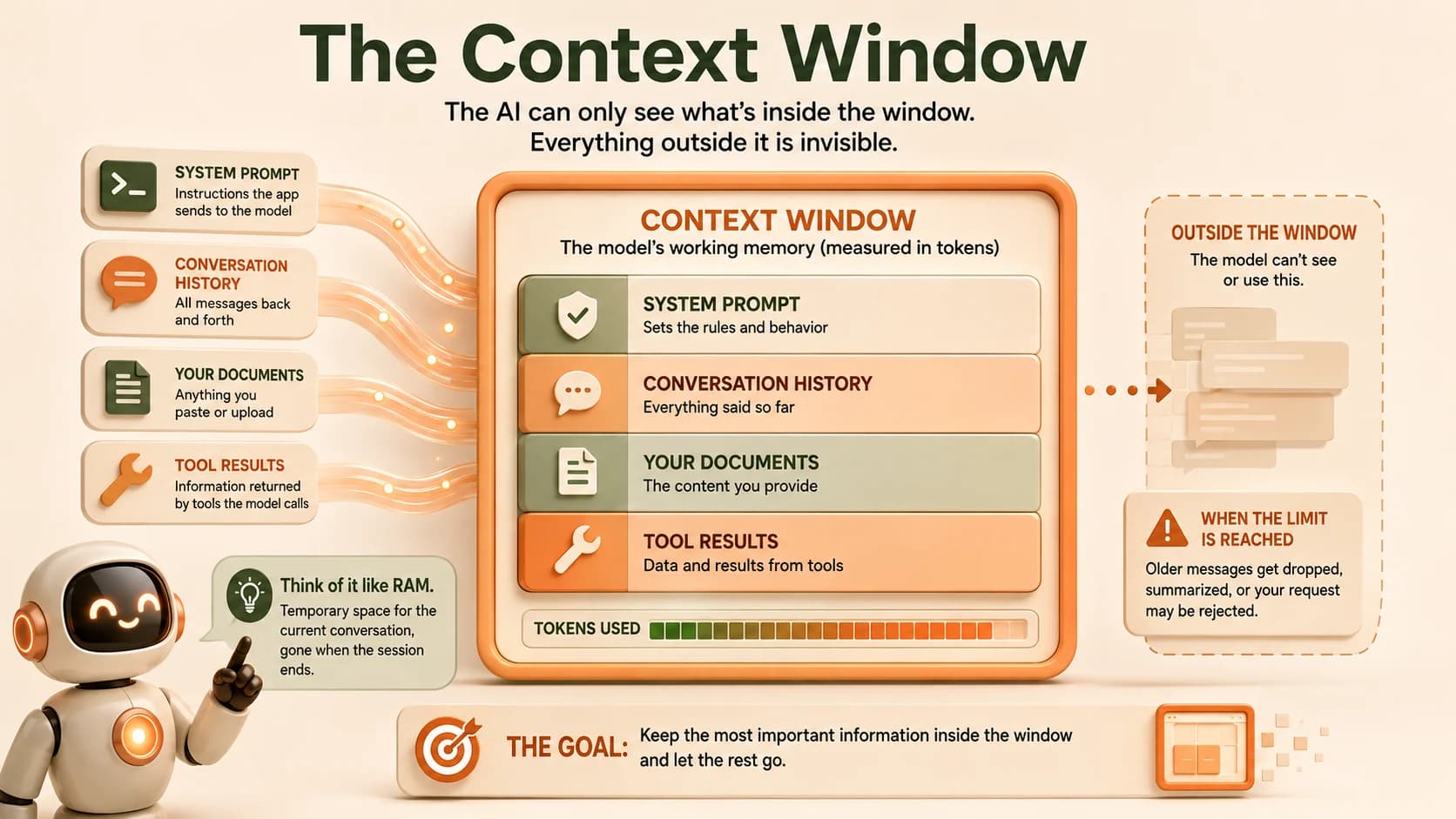
A context window is the model's working memory for the current exchange. It's not storage, and it's not the same as remembering you between sessions, it's the specific set of text the model can actually see and reason over right now. Anything outside it doesn't exist for the model. It can't reference it, summarize it, or be influenced by it.
Context windows are measured in tokens, chunks of text usually smaller than a whole word. That measurement matters because the way LLMs learn to process text happens one token at a time, and the window is a hard limit on how many of those tokens fit into a single pass.
For the short version of this definition, see the context window glossary entry.
What Actually Fills Up the Window
Every token the model reads counts against the same limit, and it adds up faster than people expect. The system instructions the app sends before you type anything take up space. So does the entire conversation history so far, every message you and the model have exchanged. So do any documents you paste in, and any results returned from tools the model called.
All of it competes for the same fixed amount of room. A long back-and-forth conversation, a big pasted document, or a tool that returns a huge result can each quietly eat through most of the available space before you've even asked your real question.
This is why pasting a giant document early in a chat can make the rest of the conversation feel worse. It's not that the model got dumber, it's that the document is now taking up room that would otherwise hold your later messages.
What Happens When You Hit the Limit
Different apps handle an overflowing context window differently. Some quietly drop the oldest messages so the model "forgets" the start of the conversation. Some refuse the request outright with an error. Some try to summarize older content down to a shorter version before continuing.
In every case, something is lost. If the dropped or summarized material mattered, expect the model's next answer to be a little less consistent, or to miss a detail it technically saw earlier in the same conversation.
How apps commonly handle an overflowing context window
| Strategy | What happens | What you notice |
|---|---|---|
| Truncation | Oldest messages get silently dropped | The model "forgets" the start of the conversation |
| Hard error | The request is rejected outright | You get an explicit "context length exceeded" message |
| Summarization | Older content gets compressed into a shorter version | Broad strokes survive, specific details often don't |
None of these strategies are wrong, exactly. They're tradeoffs a developer chose ahead of time, and knowing which one an app uses tells you a lot about how it'll behave in a very long session.
Why Bigger Isn't Always Better
The obvious fix seems simple: make the window bigger, problem solved. It helps, but it doesn't fully solve it. Even when a huge amount of text technically fits inside a large context window, research on what's known as the "lost in the middle" effect shows models get noticeably worse at using information that's buried in the middle of a long input, compared to information near the start or end.
I've seen this firsthand pasting a long document into a chat and asking about a detail from the middle section, the model reliably does worse than when I ask about something from the first or last few paragraphs, even though every word of it is technically inside the window. The full research on why this happens goes deeper into the mechanism if you want to understand it properly.
How RAG Helps
Rather than stuffing an entire knowledge base into the context window and hoping the model finds the right part, retrieval-augmented generation (RAG) retrieves only the specific passages relevant to the current question and hands the model just those. That keeps the window smaller, more focused, and avoids burying the answer in the middle of a wall of mostly-irrelevant text. How embeddings and vector stores make RAG work covers the mechanism behind that retrieval step.
A Quick Mental Model
Think of the context window as a desk, not a filing cabinet. Whatever's currently spread out on the desk is what the model can actually work with. Everything else, no matter how important, is somewhere else in the building and simply isn't in front of the model right now. Keeping the desk focused on what actually matters for the current task, rather than piling on everything you might conceivably need, is most of what "managing context well" actually means in practice.
FAQ